Knowledge Base
The Siriusware Knowledge Base is available from:
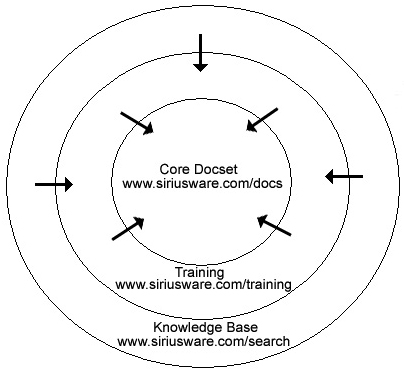
The accesso Siriusware Knowledge Base leverages SharePoint search technology to enable you to search all Knowledge Base records, training documentation and core documentation. To use the Knowledge Base, you need an Internet browser and you need Adobe Reader X (available for free from www.adobe.com) or Adobe Acrobat. The Knowledge Base has the following structure:
What is the best approach to using Salesware 4.4 documentation? The answer depends on how you need or prefer to access information. If you are comfortable with browser searches such as Google, then you should use the Knowledge Base. The Knowledge Base also has the advantage that it is a superset of all documentation. Clients searching for quick answers should use the Knowledge Base. If, however, you are mostly interested in reading about an entire module or simply want to take training, you should use the other URLs shown in the above diagram.
In addition, PDF files corresponding to each of the core documents in the core docset can be downloaded individually from the top-level bookmark links on the left side of this online Help system or from the following URL:
Salespoints should either be given access to search.siriusware.com or the complete Salesware 4.4 documentation set (with fully searchable database). In either case, Adobe Reader X or newer (available free from www.adobe.com) or Adobe Acrobat needs to be installed on each salespoint.