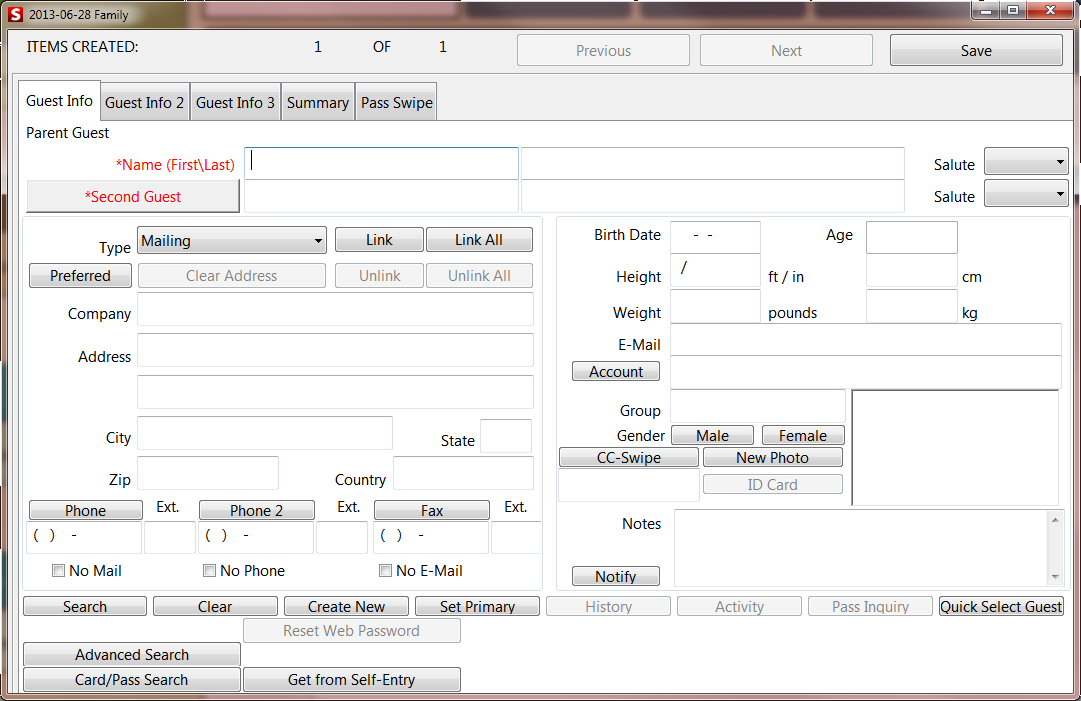
Guest Information
If after looking up a guest, no match is found, the operator must compile guest information for the pass or membership item being sold. Required fields that must be entered, are established in SysManager. The Guest Edit dialog consists of five independent tabs:
• Guest Info tab - The main dialog for collecting detailed guest information
• Guest Info 2 tab – Allows for customized entry fields
• Guest Info 3 tab – Additional area for customized entry fields
• Summary tab – Relates all summarized info on the guest, including Address, Phone Number, Email, Reservations, Passes, Items Purchased, Instructors
• Pass Swipe tab – Allows for manual entry of a pass number or is populated by a pass swipe
The Guest Info tab allows for the collection of detailed information on a guest and other guests associated with the customer i.e., family members.
The following fields are available for Guest information entry on the Guest Info tab:
• Name
• Salute
• Second Guest
• Address Type
• Address
• Birth Date
• Age
• Height
• Weight
• E-Mail
• Account Number
• Group
• Gender
• Phone
• Phone 2
• Fax
• Notes
• Photo