Creating reservations
Several options exist for starting the process of creating a reservation, as follows:
1. In an empty Sales interface, click on the Create New Reservation Header button to open a blank Reservation Header.
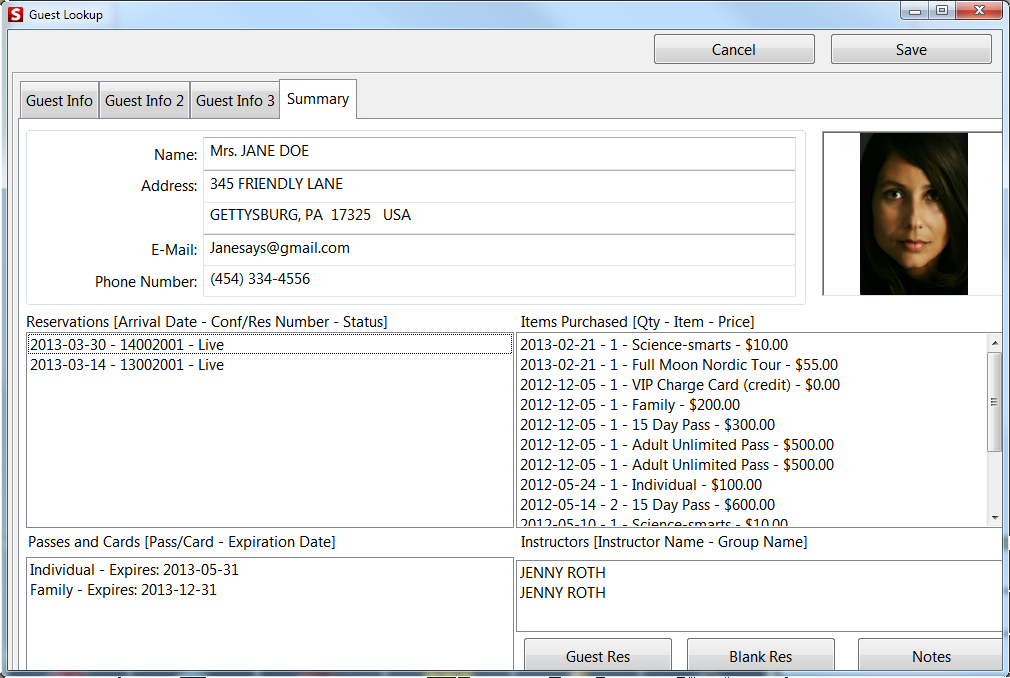
2. Reservation Headers can also be created by clicking on the Guest Lookup button. Click on the button and enter a guest name to pull up the guest record. Go to the Summary tab. Notice the two buttons that allow reservation creation (see screen capture below).
• Guest Res – Creates a new Reservation Header with the currently selected guest name attached. This can be a handy way to create a reservation and attach the guest all in one step. By default, when selecting the Guest Res button, the newly created reservation with the guest name attached pops to the screen.
• Blank Res – Creates a new blank reservation and pops to the screen.