Editing Block hold categories and subcategories
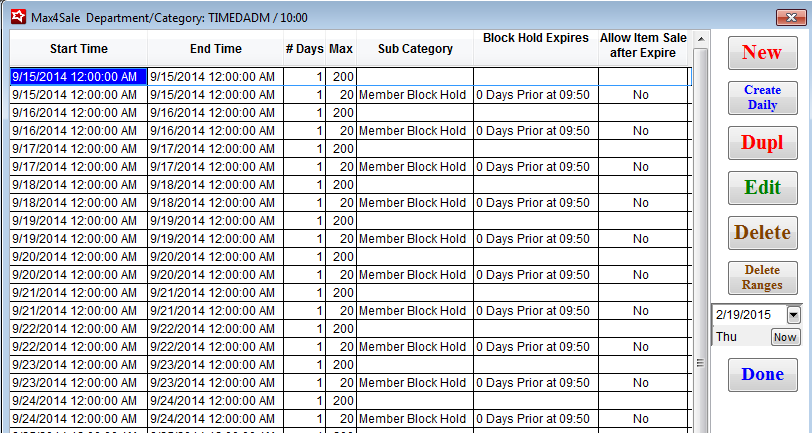
The Max4Sale button on the Category edit dialog now opens an enlarged Max4Sale grid displaying the following columns:
• Start Time & End Time - the beginning and ending date/time for the configured Max4Sale limit
• # Days - the number of days that the Max4Sale limit exists
• Max - the Max4Sale limit
• Sub Category - if applicable, the Sub Category description
• Block Hold Expires - if applicable, the number of days prior to and the time when the block hold expires
• Allow Item Sale after Expire - if applicable, indicates whether or not a Sub Category item can be sold after the block hold expires
Logic has been adjusted so that when editing an existing Max4Sale limit the Enable Block Hold check box for a Sub-Category remains unchecked if it was saved that way originally.