Configuration
In order to set up this functionality, a new Sales screen action macro, GlobalItemValidate, has been added. It has two optional parameters for validation type and pass number:
GlobalItemValidate(Validation Type, Pass Number)
Note: Pass Number may require prefix P based on Access Control setup for the blank prefix.
• Validation of type 99 (default) tries to validate all items and can take the form:
(), (99) & (99,) are possible configurations
• Validation of type 2 validates only Forced Validation items, GlobalItemValidate(2)
(2) and (2,) possible configurations
• Validation of type 3 validates only optional validation items, GlobalItemValidate(3)
(3) and (3,) possible configurations
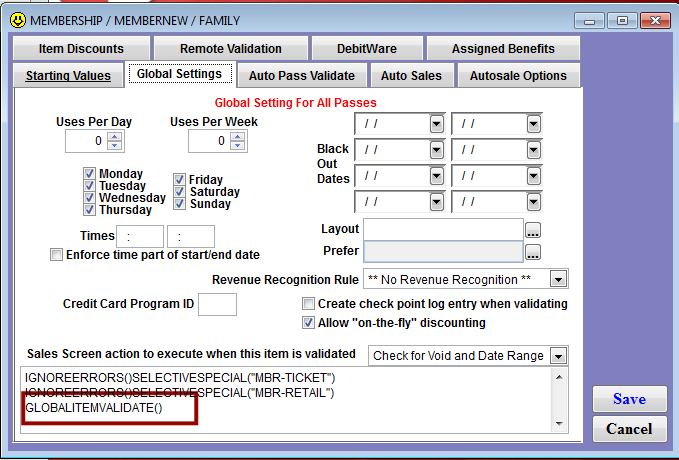
The Sales screen action macro is entered on the appropriate pass/member items within the Action Specifics section on the Global Settings tab.
If a Pass Number is included, that number is used for validation rather than the pass number being swiped (the default) (,P+pass_no) and (2,P+pass_no) possible configurations.
This macro is intended to be used along with pass swipe (%E) discount functionality. For example, the following could be added to the Sales Screen Action to Execute field of the Global Settings tab of a pass:
SELECTIVESPECIAL("101 ")GLOBALITEMVALIDATE()
This would apply, “Special 101” and validate all line items with the swipe of the pass.