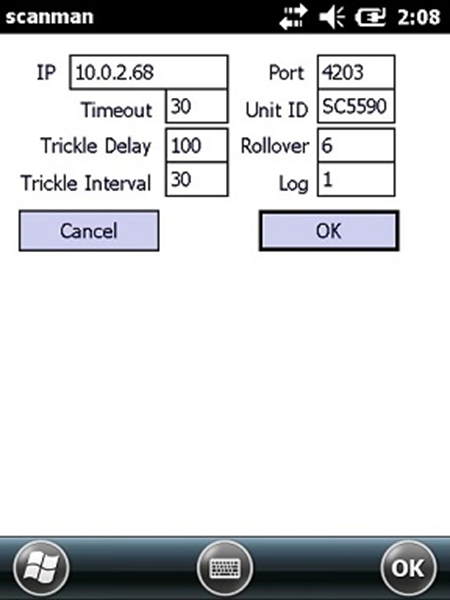
SalesEZ settings for Scanman
The following settings are included in the ScanMan.INI file created the first time ScanMan module is launched and pertain to the connection to the SalesEZ application:
Setting | Value |
IP | 127.0.0.1 (IP address of SalesEZ machine not 127.0.0.1) |
Port | 4203 |
Unit ID | Salespoint name created in Sysmanager. |
Rollover | 8 (tenths of a second) |
Timeout | 30 (tenths of a second) |
TrickleDelay | 100 (tenths of a second) |
TrickleInterval | 30 (tenths of a second) |
All times are in tenths of a second, so a value of
30 means three seconds. Rollover month is set to the middle of the off-season (see later
section for more on this). Unit ID is used in calls as the salespoint name and is distinct from other ScanMan units and salespoints.
Operator and Location are also used in communication with SalesEZ application, but are set on the unit upon launching ScanMan module.
The above settings are configurable on the unit through the Config dialog. Other settings must be specified in a ScanMan.INI file in \Program Files\Scanman on the Symbol device.
Note: Please see the section
Advanced Features for more options that can be set.