SysManager
The following changes have been made to SysManager in support of the Automated Revenue Recognition on Expired and Unused Tickets/Passes enhancement:
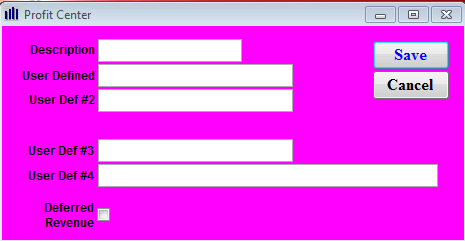
• Profit Center edit dialog: added Deferred Revenue check box. Used for reporting purposes on Revenue Recognition Report on expired access and pass records.
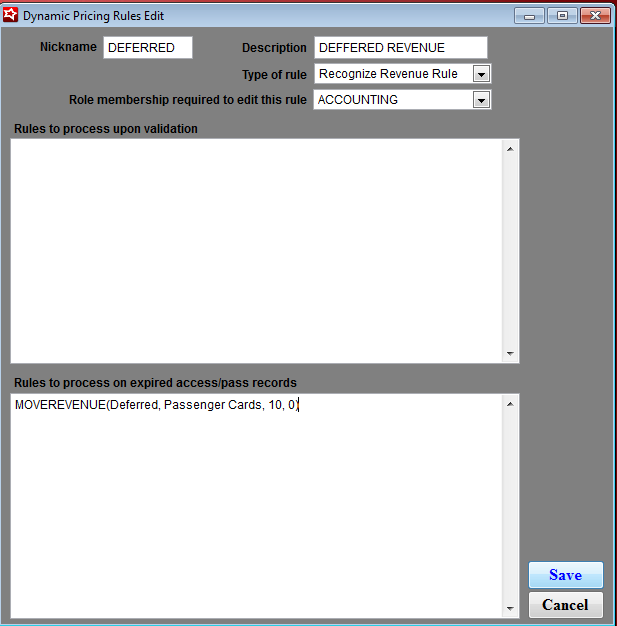
• Dynamic Pricing Rules Edit dialog: added option Rules to process on an expired access/pass records text field to use when processing Revenue Recognition on expired access and guest pass records.
Note: This option applies only on Revenue Recognition Rule types.
Note: In order to use the new automated revenue recognition on expired tickets, the Revenue Rule also needs to be populated for validation scans, even if the client does not intend to use that section of the Dynamic Pricing Rule Edit form.
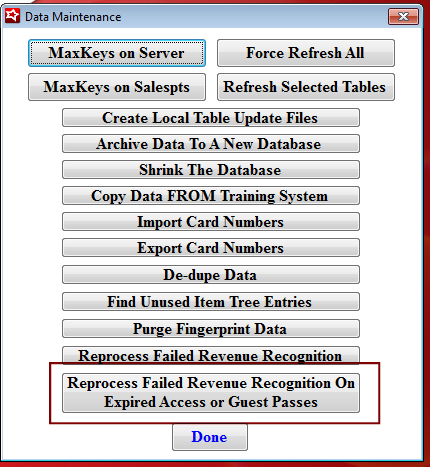
• Data Maintenance: added new option to Reprocess Failed Revenue Recognition On Expired Access or Guest Passes. This option is used to mark access or guest passes for reprocessing by Export Service application that failed Revenue Recognition. This is used once a problem is corrected or to “retire” expired or unused records so they are not reprocessed and no longer appear on the list.