Barcodes as action buttons
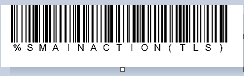
In Sales users to can create a barcode that can be scanned to act as though an action button has been pressed. This is specifically helpful with Cashless Kiosk functionality because action buttons are not readily accessible.
Example:
In order to have the interface behave as though the Tools button was pressed, encode the following into a barcode: %SMAINACTION(TLS)