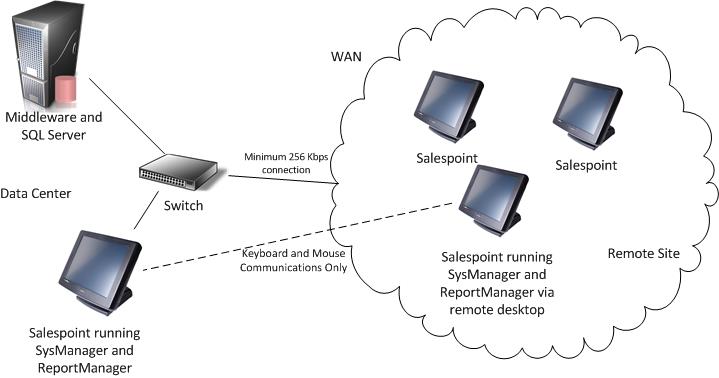
Typical WAN architecture
The following diagram shows the recommended configuration for connecting a remote Salesware site to the data center over a WAN connection.
Note: that accesso recommends a minimum 256 Kbps connection and use of a remote desktop connection to run SysManager and ReportManager from the remote site. If SysManager and ReportManager are used directly on a salespoint at the remote site, accesso recommends a minimum 1 Mbps connection. If a slower connection is used, performance may be poor. It is possible to connect a small number of salespoints to the data center over a 56K dial-up connection, but performance may be extremely slow and the process of downloading updates or rebuilding local data at a salespoint could take many hours.
Note: Salesware also supports WAN configurations where multiple Salesware sites are connected over a WAN. Each site has its own data center (SQL Server database), but ticket and pass validation can occur between sites. These configurations are described in the Salesware Validation document.