Install ActiveSync or Windows Mobile Device Center
If you are using Windows XP or earlier, download ActiveSync from the Microsoft web site. This can be found by going to the site (
http://www.microsoft.com) and searching for
ActiveSync. If you are using Windows Vista or Windows 7, download Windows Mobile Device Center from the Microsoft web site. This can be found by going to the site (
http://www.microsoft.com) and searching for
Mobile Device Center.
ActiveSync and
Windows Mobile Device Center allow you to copy files to and from the mobile computers.
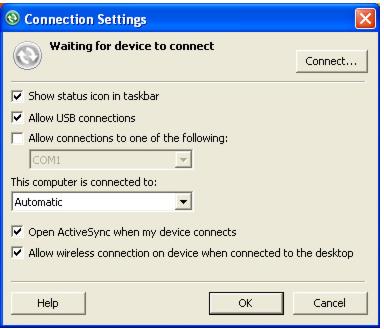
After downloading and installing ActiveSync or Windows Mobile Device Center, it is necessary to verify that the software is properly set up. To do this, go Connection Settings. The Connection Settings dialog for ActiveSync is shown in the following screen capture:
Verify that the proper ports are allowed and, if using a serial connection, the proper COM port.