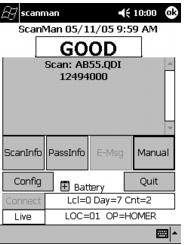
Response displayed after scan | Description of response |
GOOD | The pass/ticket was scanned while connected and was valid. |
GOOD for # | The ticket was scanned while connected and was valid for # customers at one time. |
GOOD Offline | The pass/ticket was scanned offline and is stored locally to be trickled later. |
Expired | The pass/ticket is no longer valid and has expired. If the pass has actually not expired but this message is displayed with the correct month/day of expiration, you might want to check and make sure that you didn’t include the expiration date in the barcode expression in the Pass layout without intending. |
Not enough total number of uses available on this pass | All uses for the pass/ticket that was scanned have been used already. |
This pass is not allowed at this site | This pass is not allowed at this site. |
This pass was voided by OPERATOR for reason | The pass/ticket was voided by an operator either at a salespoint or in SysManager. |
This pass is blacked out MM/DD/YYYY HH:MM through MM/DD/YYYY HH:MM for reason | The pass/ticket has been set up with a black-out period(s). This could be the item or just this pass/ticket. |
m more minute(s) and s more second(s) must go by before next validation of this pass | The pass/ticket item has been set up with an access delay to prevent it from being validated more than once during a specified period of time. |
This pass is not valid at this physical location | The pass/ticket item has been set up to be blocked at specified physical locations. |
This pass is not valid until MM/DD/YYYY HH:MM | The pass/ticket was sold and scanned before its valid period of time. |
Scan xxxxxxx INVALID. There is no record for PASS_NO PO in Table xxxxx. | This error implies an encryption or Barcode layout issue. |