Hotlist functionality
Note: This functionality is available only in versions 4.0, 4.1 and 4.2 of Salesware.
When ScanMan module is running offline, there is support for a Hotlist file. The Hotlist file can contain a list of all passes and tickets that have been voided, expired, etc. This prevents bad passes and tickets from being validated as good (which might occur because ScanMan module is not connected to the server).
How to create a pass Hotlist for offline scanning:
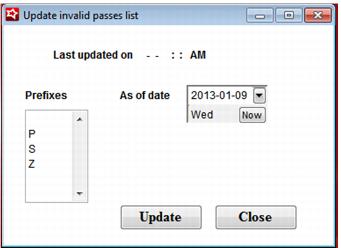
1. In SysManager, go to Activities > Pass Activities > Create Invalid Pass List.
2. Create a list of passes that are included in the invalid passes list by specifying the Prefix and the As of date.
3. The Invalid Pass List is stored on the server in a table called Hotlist. You can view its contents with either Enterprise Manager or Query Analyzer (as with any table).
4. Connect ScanMan to SalesEZ application; the Hot List loads on the scanner.
5. Disconnect ScanMan from SalesEZ application so that scanning goes offline.
Results:
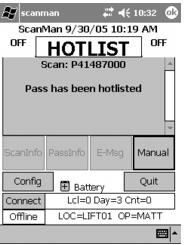
When scanning blacked out, voided or returned passes, this info displayed:
HOTLIST
pass number
This pass is Hotlisted.
When scanning an expired pass, the info shows, GOOD for an offline scan. This is because expired passes are not included in the invalid passes list in order to keep this list to a reasonable size (you wouldn’t want passes from the last five seasons cluttering the list).
When ScanMan module is launched and connects to Pool Service, it checks with the server to download the Hotlist file. The date of the file is recorded in the .INI file and the new file is obtained if a different date is listed. This check is performed only at startup and a timeout of 120 seconds is used for obtaining the Hotlist file.
Also, a scan of shows how many entries are in the Hotlist. This allows users to ensure that the Hotlist is up to date:
SETHOTLIST