Computer
The computer running GateKeeper module is a standard PC running Windows. The computer needs to be configured in the same fashion as any computer to be used as a salespoint. The PC must be configured on the network and must be able to connect to the “share” on the Salesware server. Some clients choose to map a network drive for this purpose. The PC must also be able to connect the IP address(es) of the SalesEZ server.
Because this computer most likely does not have a keyboard connected to it, it might be desirable to set up Windows to automatically log-in.
At times, it is necessary to access the computer. If there is no keyboard or mouse connected, it would be necessary to connect them. An alternative is to use a program such as TeamViewer. Siriusware, Inc. often uses TeamViewer to help with technical support across the Internet, but it is also convenient to use on your own network. In this case, the TeamViewer can be installed on the GateKeeper computer, and a client can be installed on another computer. This allows the user to connect to the PC remotely for the purposes of configuration, troubleshooting, etc.
GateKeeper module is designed to run at a resolution of 640x480. Unfortunately, many computer graphics cards do not allow reduction to this resolution. If this is the case, here is solution to the issue:
1. Click on the Start button
2. Type msconfig into the search bar and hit Enter.
3. Click on msconfig.exe
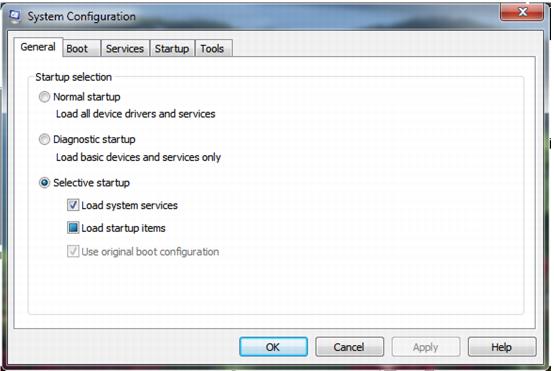
4. The System Configuration Utility appears:
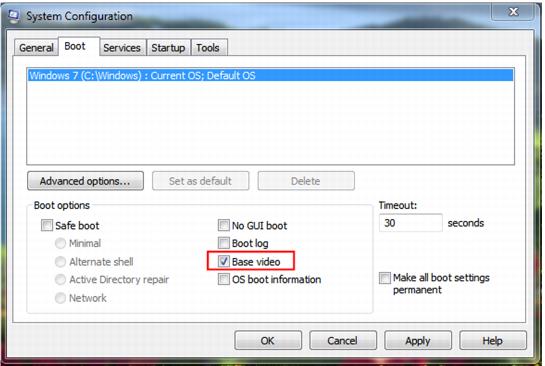
5. Switch to the Boot tab as shown in the above figure.
6. Check the box labeled BASEVIDEO.
7. Click OK and, if ready, restart the computer to test the change.