Installing GateKeeper module
To install GateKeeper module:
1. Download the following installers from the Siriusware Information Portal:
• Install_Siriusware_CommonFiles_xxxx.msi
• Install_Siriusware_Gatekeeper_xxxx.msi
2. Install Common Files application as described in the Salesware Installation Guide.
3. Double click Install_Siriusware_Gatekeeper_xxxx.msi.
4. Allow shortcuts to be placed on the desktop. (Don’t uncheck the check box – use the default.)
5. On the SalesEZ IP address dialog, enter the IP address of the computer where SalesEZ application is running.
6. When the install is finished, double-click the GateKeeper icon on the desktop.
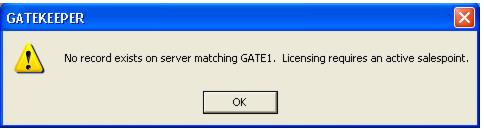
If you haven’t already created a salespoint in SysManager for this installation of GateKeeper module you get the message:
GATE1 is the default salespoint name assigned to the
salespoint .INI setting in
GateKeeper.INI. You need to create a salespoint named
GATE1 using SysManager or choose a new name if you wish. See
GateKeeper licensing for more information.