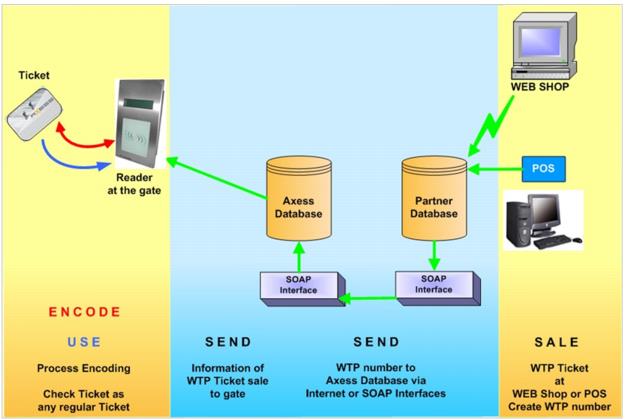
Axess architecture
NEW MEDIA Sale (Encode): During the card encoding process
1. The RF Serial number is generated and inserted into the rf_serial field of the access or gst_pass record.
2. The WTP number for the card is retrieved from the Axess Smart Printer and inserted into the corresponding wtp_no field of the access or gst_pass record. A MEDIA ENCODED record (activity type 150) is also generated in either acc_actv or gst_actv whenever a piece of media is encoded. The presence of new MEDIA ENCODED records (activity type 150) is used to generate updates to the SOAP EDE.
RELOAD of MEDIA at a salespoint:
1. Finalization of a reload sale prompts the operator to hand-feed the existing media into the Axess Smart Printer for the encoding process.
2. At the time the card is encoded, Sales updates the new access or gst_pass record with a new RF Serial number and the existing WTP number.
3. Sales generates a MEDIA ENCODED (activity type 150) record within the acc_actv or gst_actv table in order to send an update to the SOAP EDE.
4. Finalization of a reload sale that includes the manual entry of a WTP number, in lieu of a card encode, generates a RELOAD record (activity type 151) in either gst_actv or acc_actv in order to send an update to the SOAP EDE for later encoding by the Axess Gates.
NEW MEDIA in E-Commerce:
1. An E-Commerce sale of a new pass item results in the sale being finalized in Sales Host utility.
2. An operator must then lookup the pass and encode it with the Axess Smart Printer.
3. When the pass media is encoded, an RF Serial number is generated and inserted into the rf_serial field on the gst_pass record; and the WTP number is retrieved from the Axess Smart Printer and inserted into the wtp_no field in the gst_pass record.
4. A MEDIA ENCODED record (activity type 150) is also generated in gst_actv to send an update to the SOAP EDE.
5. An E-Commerce sale of new ticket items results in Sales Host utility creating a saved sale.
6. The saved sale must then be recalled and finalized at a salespoint that has an Axess Smart Printer.
7. RF Serial numbers are generated during the ticket encoding process and inserted into the rf_serial field of the access records; and the WTP numbers are retrieved from the Axess Smart Printer and inserted into the wtp_no fields of the access records.
8. Sales generates MEDIA ENCODED records (activity type 150) in acc_actv to update the SOAP EDE.
RELOAD of MEDIA in E-Commerce:
1. A visitor/guest starts by entering his/her WTP number.
2. The WTP number is verified as valid (it exists within SiriusSQL database) and a list of eligible reload items is returned.
3. The visitor/guest adds the desired item to the cart and completes the checkout.
4. Sales Host utility processes the sale and forwards the new access data including a new RF Serial number and the existing WTP number to SiriusSQL via SalesEZ applications.
5. Sales Host utility also creates a RELOAD record (activity type 151) within the acc_actv table in order to generate an update to the SOAP EDE.
SCAN Data:
1. A SOAP EDE call (GetReaderTransactions) gathers gate validation data from the Axess Oracle database based on the RF Serial Numbers.
2. The data is fed to SalesEZ application in order to generate the appropriate usage data in SiriusSQL application.
3. All scans fed to SalesEZ application in this manner are treated as “trickled” scans.
4. This method allows the standard scanning reports to be utilized in the Siriusware ReportManager application, as well as more complicated features such as triggering Revenue Recognition Rules and Direct-to-Lift capability.