RELOAD pass items printed/encoded on reloadable media
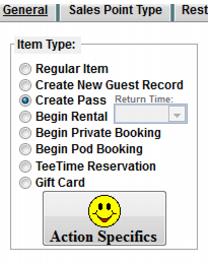
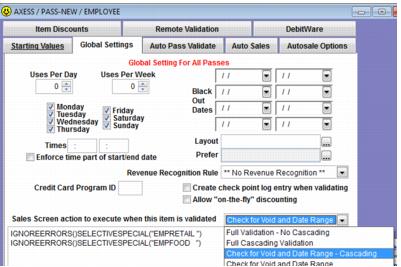
For pass items that reload existing media the item must be configured to Create Pass. The configurations within the Action Specifics are still important for Siriusware In-House Cards programs and salespoint validation features i.e., the %E discount function. And, although validation is controlled by the Axess Gates and not the configurations within the Pass Action Specifics, it is still necessary to configure the typical settings, such as Total Number of Uses, for consistency when researching guest pass records in Siriusware vs. WTP/RF Serial Numbers in Axess and for exchanges.
A Graphic Pass layout can also be created, and then selected within the Action Specifics > Global Settings tab in order to print the typical information on the pass (guest name, item description, guest photo, etc.) if using a graphic card printer along with the Axess Smart Printer. This layout would only be used during exchanges for lost passes; not during the initial reload transaction.
Axess printing of RELOAD pass media:
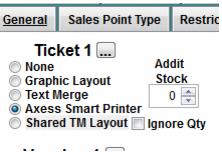
In order to send instructions to the Axess Smart printer for encoding or the Axess SOAP EDE for WTP reloads, you must configure a Text layout for the item under the Axess Smart Printer option:
Note: Please refer to the Axess Smart Printer Layouts section of this document for more details on configuring layouts.
Note: Additional printing using a Graphic layout would only be used during exchanges of lost media. Please refer to the Printing Options noted previously for NEW pass media sales.