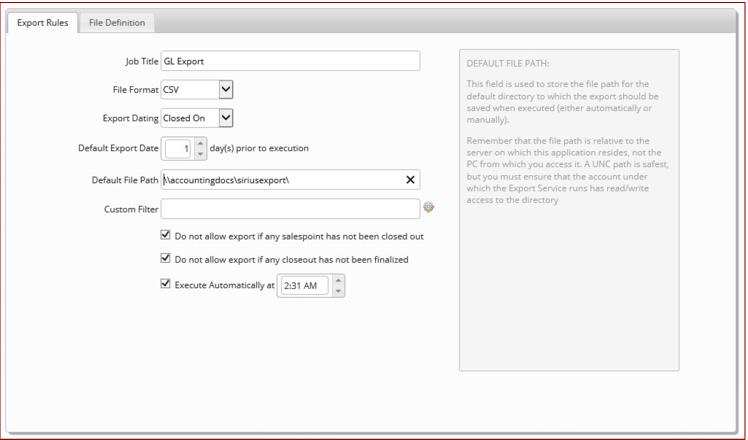
Export Rules
• Job Title: A descriptive name for the export job, used (along with a date/timestamp) in the export file name.
• File Format: Comma-separated values (CSV) or tab-delimited text (TXT).
• Export Dating: Choose from either Sold On (transaction date), Closed On (date salespoint was closed out) or Finalized On (date closeout was finalized). Because many column detail fields are enabled or disabled based on this field, it is recommended that you do not change this field for jobs for which you have already defined columns. It is best to create a new job in this scenario for the most reliable results.
• Default Export Date X day(s) prior to execution: The number of days prior to the execution date for which the export is run. This setting only applies to automated execution.
Example:
If the export is executed at 1:00 AM and you want the previous day’s sales exported, you set this value to 1 (for one day prior).
• Default File Path: This field is used to store the filepath for the directory to which the export is saved when executed (either automatically or manually). The filepath is relative to the server on which this application resides, not the PC from which you access it (in other words, C:\temp\ would write the file to the temp directory on the server’s C drive, not the client’s). A UNC path is safest, but you must ensure that the account under which the Export Service runs, has Read/Write access to the directory.
• Custom Filter: Similar to custom filters in ReportManager, this feature allows users to add a filter to the entire job via a SQL expression applied to the sale_hdr table.
Example:
To limit the export to include only transactions related to reservations, the expression sh.reserv_no <> 0 could be used. To only include sales from a particular salespoint, the expression sh.salespoint = 'WEBSP' could be used, and so on. Only the sale_hdr (sh) table is exposed to this custom filter.
• Do not allow export if any salespoint has not been closed out: If checked, the export halts if it finds any transactions on the given date that have not yet been closed out. Once corrected, the export runs successfully.
Note: this option only applies to jobs which are based on Sold On dating.
• Do not allow export if any salespoint has not been finalized. If checked, the export halts if it finds any transactions which have been closed out but the closeout has not been finalized. Once corrected, the export runs successfully.
Note: This option only applies to jobs which are based on Closed On dating.
• Execute Automatically at X: When checked, the job is scheduled for automatic execution by the Export Service at the given time.
Note: Detailed descriptions of each Export Rules entry field are found within the information text box to the right of the selections.