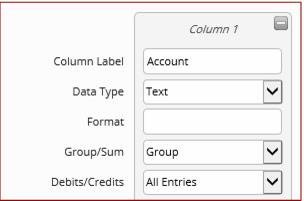
Column Headers
After creating an export column for each column required in the file, the user defines each column’s overall attributes with a few key settings:
• Column Label: The Column Header label to appear at the top of the file (up to fifty characters).
• Data Type (Text, Date/Time, Numeric): What type of data appears in this column. The Data Type that is selected, determines the column detail options available below.
• Format: A valid .NET formatting string, to be applied to all values in this column (e.g., “yyyy-MM-dd” for date formatting, “0.00” for a two decimal numeric value, etc.).
Note: Format only available with SQL Server 2012. It does not appear if using SQL Server 2008 R2 or less.
• Group by Column (Group or Sum): Determines whether data reported in this column is grouped by unique values or if the values are aggregated into a single sum. The Sum option is only available for columns with a Numeric data type.
• Debits / Credits (All Entries, Debits Only, Credits Only):
All Entries = All values are reported in this column. For columns with the Text or Date/Time data type, this is the only option available.
Debits Only = Only positive values are reported in this column. For negative values, report zero. This option is only available for columns with Numeric data type.
Credits Only = Only negative values are reported in this column, as an absolute number. For positive values, report zero. This option is only available for columns with Numeric data type.