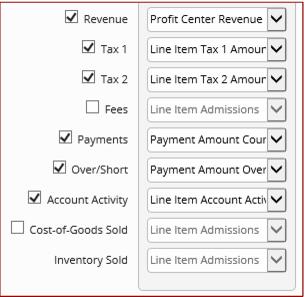
Export rows
In order to create a complete, balanced financial record that clearly reflects Siriusware Sales data, several elements of a transaction must each be reported. The simplest sale, a customer buying a ticket for cash, is comprised of just two elements: a credit to revenue and a debit to cash. Sales data can get more complicated very easily, with multiple layers of taxes and fees, over/short discrepancies found during closeout, account activity from reservation deposits, etc. In order to export a balanced file, all row types is selected for export (though COG/inventory is always optional, as they are self-balancing and pertain only to users of our Retail module). If creating a more specialized export for other purposes, it may make perfect sense to select only a single row for export.
Rows that are available for export:
• Revenue: The revenue earned for finalized sales. Clients usually report revenue by Profit Center, but other grouping options are available as well. Sales are reported as credits, refunds as debits.
• Tax 1 / Tax 2 / Fees: The amounts collected for Tax 1, Tax 2 and the seldom-used Fee feature. These are each separate options because the data is recorded separately, but if you wanted the values combined you could adjust the output for each to match, thus ensuring they are aggregated into a single sum in the final output. Taxes collected are reported as credits, refunds as debits.
• Payments: Payment amounts collected/refunded. If the Closed On or Finalized On dating options are selected, then finalized payment amounts are available. Otherwise, if Sold On dating is selected, only expected payment amounts can be reported. Payments are reported as debits, refunds as credits.
• Over/Short: Over/short amounts, as recorded during the closeout/finalization process. The Over/Short line is only activated on jobs which are based on Finalized On, as the over/short figure is officially recorded when the closeout is finalized. In addition, when reporting on Over/Short, the Payments line is set to report Payment amount counted, not Payment amount expected, in order for the job to balance correctly. Over is reported as a credit, short as debit.
• Account Activity: All financial activity related to account invoices. These can be accounts and invoices created for A/R use (such as a tour operator or school group), system accounts used to track deferred revenue for saved sales and reservations (*GUESTS*, *RESRVATN*, *TABLES*), accounts and invoices related to In-House Cards items and others. As a rule, all Account Activity represents some sort of movement of deferred revenue. When a sale is finalized to an invoice, a credit would be reported under Revenue above and the corresponding debit would be reported here under Account Activity. Once payment is received, perhaps at a future date, the payment would be reported as a debit under Payments above and a corresponding credit relieving the liability would be reported under Account Activity.
• Cost-of-Goods Sold / Inventory Sold: Retail cost of goods and inventory value sold (for inventory items only). Because each entry depends on the other for a balanced transaction, they are selected as a pair with a single check box. Sales are reported as a debit to Cost of Goods and a credit to Inventory. Refunds are reported as a credit to Cost of Goods and a debit to Inventory.