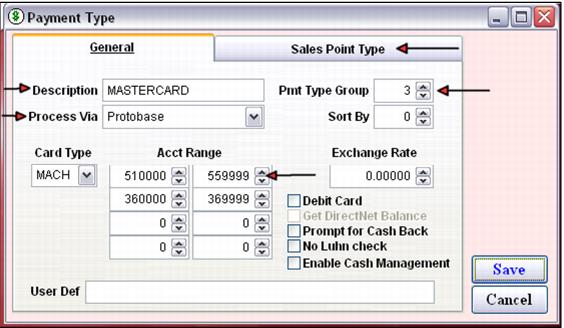
Configure payment types
You use SysManager > Activities > Financial Lists > Payment Types to configure payment types for each type of card you accept. With the Sales Point Type tab you can also limit what types of payments are available per salespoint type if necessary (This is one of the few remaining uses for the Salesware 3.x salespoint type functionality accessible from SysManager > Preferences > Sales Point Types – there is no other way to implement this functionality.)
The Process Via is set to ProtoBase. The Card Type is set according to the following table:
Card Type field abbreviation | Card type |
AMEX | American Express |
CTBL | Carte Blanche |
CUP | China Union Pay |
DINR | Diners Club |
DISC | Discover |
ENRT | En Route |
JCB | Japan Credit Bureau |
MACH | Master Charge |
VISA | Visa |
PRIV | Not implemented yet |
DBTW | Debitware (In-House Cards module) – See the document Salesware In-House Cards |
Please use the BIN ranges (Acct Range) described in the following table. Most clients probably don’t need/want the JCB or BankCard entries. The table has the card, BIN ranges and the acceptable lengths of the card number. Acceptable lengths are provided for informational purposes only. They are handled automatically by Salesware; you do not need to configure them manually in Salesware module.
Card | BIN range(s) | Acceptable lengths of the card number |
American Express | 340000-349999 370000-379999 | 15 |
Visa | 400000-499999 | 13 or 16 |
MasterCard | 510000-559999 | 16 |
MasterCard (due to the new MasterCard/Diners Club alliance in North America) | 360000-369999 | 14 |
Discover Card | 601100-601199 650000-650999 | 16 |
Diners Club | 300000-305999 380000-389999 | 14 |
Japan Credit Bureau | 300000-399999 | 16 |
Japan Credit Bureau | 180000-180099 213100-213199 | 15 |
BankCard | 560000-561999 | 16 |
China Union Pay (No Luhn Check, checked) | 622126-622925 625000-626999 628200-628899 | Acceptable lengths are unknown |
You can also enter a Payment Type Group for each payment type configured. This is used on reports to subtotal payment types configured with the same group number together. For example, Visa, MasterCard, Discover Card and American Express are all in group 3. The Cash Drawer Report shows the total for each payment type and it totals all payment types included in group 3 together so that you can see your total for these credit cards.
Sort By impacts how the operator sees the payment types sorted on the Finalize dialog in Sales (first by the Group number, and then by the Sort By number). Even though credit cards are the most common form of payment next to cash, you do not need to sort these payment types to the top of the list. When using a credit card for payment in Sales, there is no need to select the payment type or even click the Finalize button. Simply swipe the card and the system selects the appropriate payment type based on the card number swiped.