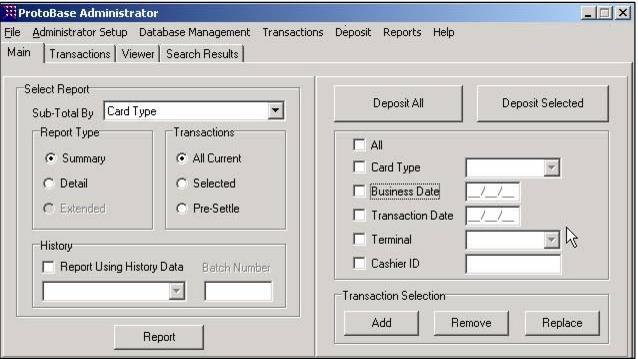
ProtoBase batches and subtotaling
ProtoBase assigns the same batch number to all transactions deposited at the same time. It is possible to get a breakdown within the single large batch based on either Siriusware salespoint name or Siriusware operator name.
By default, Siriusware Inc. provides the salespoint name to ProtoBase. The Siriusware salespoint name is inserted into the ProtoBase cashier ID field. Thus, by default, within a single ProtoBase batch the individual transactions and subtotals per Siriusware salespoint may be viewed.
Instead of using the Siriusware salespoint name for grouping transactions within a ProtoBase batch (default functionality), the Siriusware operator name may be sent into ProtoBase as the cashier ID. The individual credit card transactions and subtotals would then be viewed by Siriusware operator name instead of Siriusware salespoint name within ProtoBase batches.
To specify sending in the Siriusware operator name instead of the salespoint name, a Sales .INI setting must be in place. It is recommended that this setting be inserted in the <defaults> section of the global .INI (SysManager > Preferences > Miscellaneous > Global INI tab) so that all salespoints follow this setting. (The same setting needs to be removed from the local .INI file or from the global group sections in order to make the global default setting take effect.) The global .INI is discussed in detail in the Salesware .INI Settings Reference document.
[Preferences]
SettleByOperator=TRUE
Sending in the Siriusware salespoint name or Siriusware operator name is a decision that must be made by you – specifically, by your accounting department, as this is the department that typically shoulders the responsibility for credit card activity and reconciliation. If a client typically reports by operator, then sending in the operator name to ProtoBase as the cashier ID might make sense. If a client typically reports by salespoint or salespoint group, then sending in the salespoint name to ProtoBase as the cashier ID might make more sense. Again – this decision must be made by the client.
Note: In the past, Cardware (former name of Charge Cards module) batches were always reported by salespoint, so if you have used Cardware in the past, there may be more of a comfort level with reporting by salespoint name rather than operator name – thus the reason for the default setting of using salespoint name as the ProtoBase cashier ID.
Additional settlement options
Credit Card transactions in ProtoBase may be settled by Transaction Date or by Business Date:
1. The Transaction Date in ProtoBase is the date that the card was authorized.
2. The Business Date in ProtoBase corresponds to the “sale date” in Sales. Sale date may be altered via the set carryover functionality in Siriusware software.
Another option to use in determining what transactions to settle is terminal ID, which is set per salespoint in the Sales > Tools > Credit Cards > General Setup menu. One possibility is to give all salespoints within a given business area the same terminal ID (for example, tickets could be TIX; ski school could be SS, etc.). You can then settle by business date (sale date) and terminal ID, which would allow you to settle all transactions for the venue at one time.
Report and selection comparisons options
Various Siriusware reports can be run via ReportManager to compare with the credit card transaction information from ProtoBase.
Example:
If using the ProtoBase terminal ID to represent an operational venue, Siriusware reports such as the Daily Summary Report can be run via the salespoint group selection to compare to the settlement information.
PBAdmin Selection | Siriusware Designation |
Card Type | Payment Type |
Business Date | Sale Date |
Transaction Date | Date Card was Authorized |
Terminal | Credit Card Terminal (in Tools > Credit Cards > General Setup) |
Cashier ID | Salespoint Name or Operator |