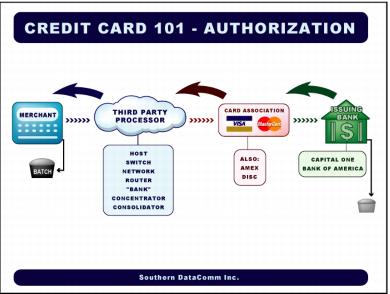
Authorization process flow
Authorization flow
1. Card is swiped at the salespoint.
2. Transaction is transmitted to third-party processor.
3. Third-party processor looks at the BIN number – Bank Identification Number (first six digits of card) that identifies the card association and issuing bank – and forwards the transaction to the appropriate card association or company.
4. Card association looks at the BIN number further to determine who the issuer of the card is, and then forwards it to that issuer.
5. The issuer receives the transaction and looks up that card in their database. If the card account has enough funds and is authorized, the issuer puts a hold on their open-to-buy.
6. The issuer responds to the card association with either an authorization number or a decline message.
7. The card association forwards the response to the third-party processor.
8. The third-party processor forwards the response back to ProtoBase /salespoint.
9. ProtoBase /salespoint puts that transaction in a batch.
This process happens 100’s of times throughout the day. The batch then needs to be deposited so the merchant can get funded for their goods and/or services.
In addition, there are two capture methods:
1. Terminal capture:
• Transactions stored in the salespoint or ProtoBase Server at the merchant’s location
• Costs the merchant less money due to communication cost, does not have to dial out for voids or returns.
2. Host capture
• Transactions are stored at the third-party processor
• Cost more for the merchants because the TPP is managing their transactions
• Every must dial out to update the host