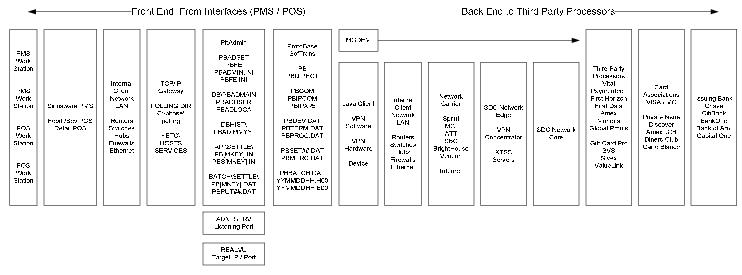
ProtoBase credit card interface components and points of failure
The following diagram presents the entire ProtoBase interface. It is used to determine points of failure.
What is the reporting process In lieu of seller's not being able to print a Close Batch Report?
Using ProtoBase, closing the batch at the salespoint is optional. The station’s CC transactions are forwarded to ProtoBase, regardless whether the batch is closed or not at the salespoint.
However, “closing the batch” is something a misnomer. No batch is closed by hitting a button. The only reason to “close the batch” with ProtoBase is to get a list of the CC transactions for the logged in operator.
Note: If the previous day’s transactions have not been settled, they show on this list as well as the current day’s transactions. This is a very common technical support call from those who use the Close Out button in Sales > Tools and ProtoBase. The client calls and says the list doesn't agree with what the operator did today. The query that runs to furnish the list is based on the currently open batch in ProtoBase.
If you are interested in retrieving a daily summary of a station’s CC activity, going to Sales > Tools > Credit Cards > Close Batch gives you a brief printable report. Alternatively, you could run the Batch Detail Report in ReportManager and get the same information, but it also includes card numbers and other sensitive CC information.