Procedures
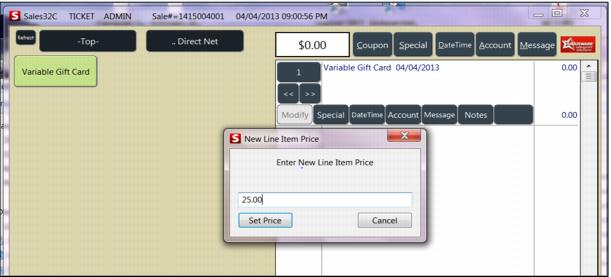
1. Seller chooses Variable Priced Gift Card product.
2. Enter in the amount of dollars to put on the gift card on the New Line Item Price dialog box.
3. Select Set Price.
4. Click on the Message button.
5. Swipe the card to record the gift card number.
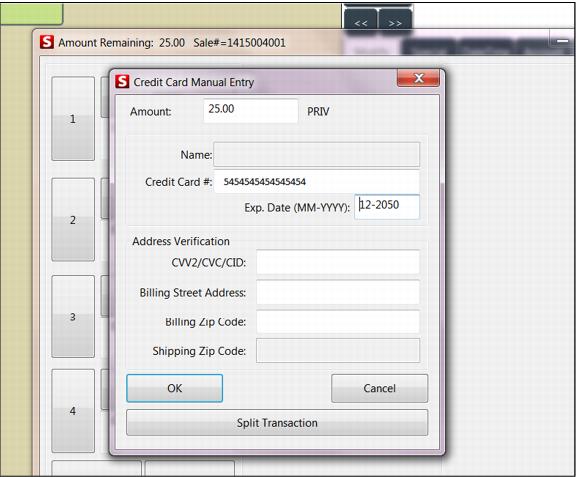
Note: In some cases this pops the manual entry for the gift card payment type. If the information is correct, select OK, and then choose the GCACTIVATE payment.
6. If the Payment Type does not automatically pop, select Finalize.
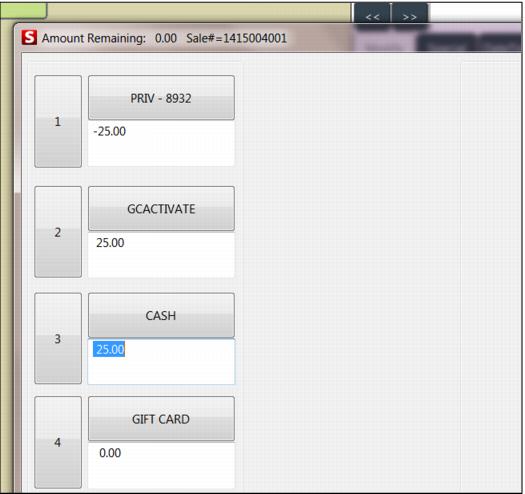
7. You select three types of payment to process the gift card in this order:
• Select GIFT CARD
• Enter in the amount of the gift card in negative dollars. (-25.00) Payment box changes to PRIV - #### (last four digits of Gift Card)
• Choose GCACTIVATE.
• Enter in the amount of the gift card (25.00).
• Choose method by which guest is paying for gift card (Cash, Credit, Check, etc.).
• Enter in the amount of the gift card (25.00).
• Click OK on the three dialogs.
• Press REPRINT to print two receipts if two don’t automatically print.
• Guest signs one receipt, the other is for your backup.
• Insert the Gift Card in the holder and give guest the receipt and their new Gift Card now loaded with dollars.
Note: The guest should record their number in a safe place and save their receipt for backup.