Setting up a salespoint as CNP
1. Extract zip file to c:\ Orbital.zip.
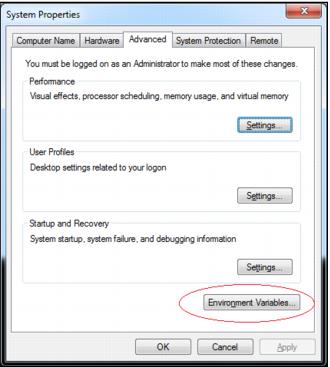
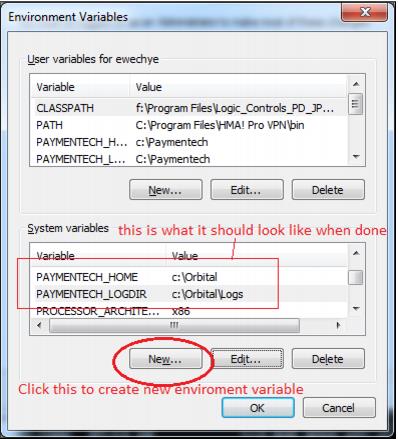
2. Create two new environment variables:
• PAYMENTECH_HOME=C:\Orbital
• PAYMENTECH_LOGDIR=C:\Orbital\Logs
3. Control Panel > System ( or search of edit the system Environment Variables in windows 7)
4. Copy the below section into c:\program files\siriusware\sales\sales32c_system.INI:
[VersaPay]
; given by paymentech/versapay
MerchantID=000010163768
TerminalID=001
BIN=000002
; setup for canadian currency
CurrencyCode=124
CurrencyExponent=2
; setup for us currency
;CurrencyCode=840
;CurrencyExponent=2
;user name and password, setup by paymentech/versapay
OrbitalConnectionUserName=
Pass=
; ComPort the pinpad is connected to.
Port=1
5. You need to modify MerchantID, TerminalID, OrbitalUserName, Pass and Port:
• MerchantID/TerminalID, unique identifier for the client supplied by Versapay
• OrbitalUserName/Pass is the log-in credentials from Versapay
• Port is the com port number that the pinpad is connected to.
• Uncomment the US currency portion and comment the Canadian currency portion if installing for a US client.
6. For MOTO stations (i.e., no pinpad) set the Sales32c.INI to:
[Preferences]
MOTO=TRUE
7. Disable credit card receipt printing in Sales for stations that have pinpads.
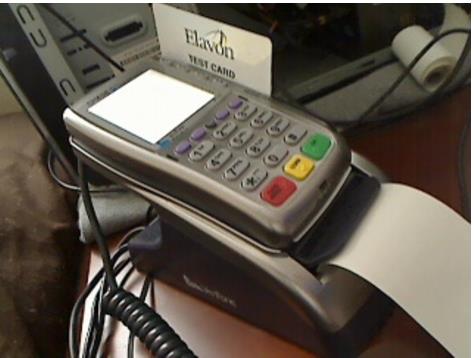
8. Below is a screen capture of what the pinpad looks like. It has a base with a built in receipt printer.