Configuration
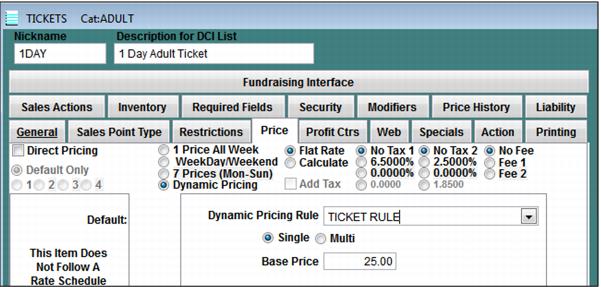
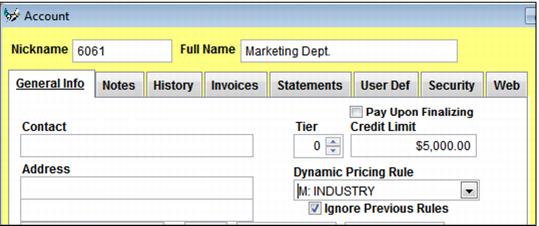
Dynamic Pricing Rules are configured in SysManager > Activities > Item/Sales Lists > Dynamic Pricing Rules. Existing Dynamic Pricing Rules may be attached to items by selecting the appropriate rule from within the SysManager > Activities > DCIs > New/Edit > Price tab and/or existing rules can be attached to accounts by selecting the Dynamic Pricing Rule from within the SysManager > Activities > Accounts > General Info tab.
There are also two Sales32c.INI settings that can impact the behavior of Dynamic Pricing Rules as they relate to the calculation of the prices upon recall of a sale or reservation:
• ApplyAccountRulesOnRecall
• RecalculatePriceOnRecall
Both settings by default are set to TRUE, which means that if they are not present and defined otherwise in the local, group or default .INI salespoint files, Sales assumes a TRUE value for both settings. ApplyAccountRulesOnRecall allows an account to be added to a saved and recalled sale and adjust the price of the items based on any Dynamic Rules associated with the account. In order to prevent the account rules from discounting the items further each time the sale is recalled, RecaculatePriceOnRecall=TRUE is used to “re-set” the price back to the starting point and recalculate all rules associated with that item. For more information, see the Salesware .INI Settings Reference document.
Note: When scanning/redeeming vouchers within the ScanMan or GateKeeper modules, the auto-sold item cannot be priced using Dynamic Pricing Rules (ScanMan and GateKeeper do not support the Dynamic Pricing Rule logic). When ScanMan or GateKeeper modules use SalesEZ application to create the auto-sold ticket, SalesEZ is the one that is actually creating the sale, acting like it was a salespoint. SalesEZ application can do only very basic price calculations because it doesn't have the Dynamic Pricing capability that is built into Sales.