Editing a key
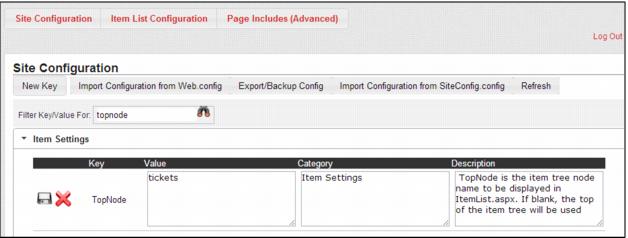
An easy way to edit the value for a key, is to use the built in search capability in Site Configuration. A search box labeled Filter Key/Value For is located near the top of the page. Enter the name of the key that you want to edit into the text box and click the binoculars icon. This returns the key matching the name entered. If you don’t know the full key name, you can search on a partial name. For example searching for node returns the keys imagenodes, NoDefDate, and TopNode. Click on the notepad/pencil icon to enter the edit mode for that setting. Here you can change the Value, Category and Description as needed. Once you have completed your edits click the Save icon to save your changes or click the red X icon to cancel your edits.
Important: You must click the Refresh link in order for your changes to take immediate effect in the pages.