Basic In-House Cards configuration
For more details about In-House Cards configuration, see the Salesware In-House Cards document.
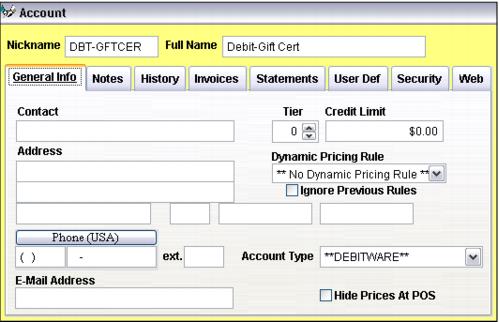
1. Account configuration
• Must be **Debitware** Account Type
• Credit Limit is set to $0.00
• No Dynamic Pricing Rules are selected
• Configure one account per In-House Cards program
• Secure these accounts to limit the operators who can edit them
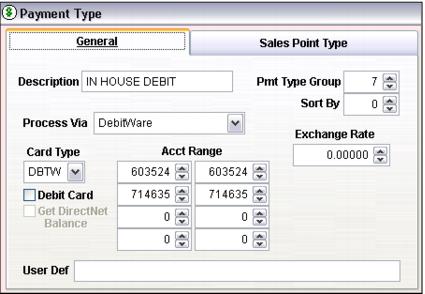
2. Payment Type configuration
• Set Process Via to DebitWare
• Set Card Type to DBTW
• Set Acct Range to match the In-House Cards number range you are using
3. Item configuration (pass items are configured for the actual In-House Cards programs)
• Determine and set valid dates
• Assign number from basket or not
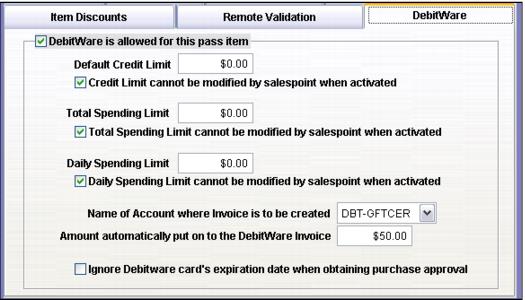
• DebitWare tab
• Limits
• Editing limits at activation
• Account for tracking invoices
• Pre-load amounts
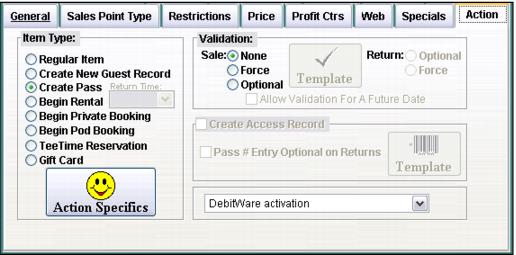
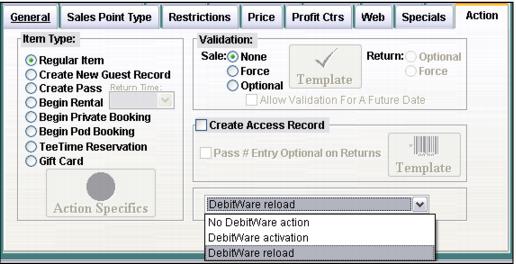
• Action tab
• Activate at time of sale or later
4. Other essential item configurations
• Activation item
• Reload item
5. Salespoint configuration
• Add the following to the [Preferences] section of the Sales32c.INI file for your Sales Host if you use the assignno table to assign In-House Cards swipe_nos: AssignNoQty=(1,5) (substitute the appropriate BIN number and quantity for your setup)
• If you want to allow guests to be able to reload money onto their cards set the following in the [Preferences] section of the Sales32c.INI file for your Sales Host: GuestAnywhere=TRUE