Use In-House Cards as form of payment online
To allow the use of In-House Cards as a form of payment in E-Commerce module, you must set the value for the site config key DWPayment to 1. This enables a check box (asp:checkbox id="cbDebitWare") on the Checkout.aspx page (Checkout3.aspx if using CheckoutSteps - see note below) to appear. When this box is checked, the user can enter his In-House Cards swipe_no into the Card number field on the page – the Expiration and CVV2 fields are deactivated as they are not required for an In-House Cards payment.
Note: When using
CheckoutSteps (
Site Admin Panel >
Checkout Settings >
CheckoutSteps value =
1), up to four payments can be made on a sale using one or more credit cards, one or more In-House Cards or a combination of credit cards and In-House Cards – see
Using multiple pages to display and handle the E-Commerce checkout process for details.
The web pages and ww.dll determine if the In-House Cards card is valid and has sufficient funds for the sale before allowing the sale to be finalized. If the card is not allowed, the message from the site config setting DWInsufficentFundsMsg is displayed on the page and the visitor/guest needs to enter another form of payment to complete the sale.
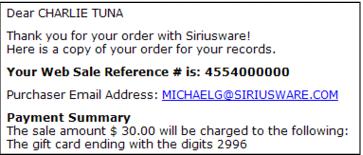
The site config setting DWPmtTxt is used to populate the text that displays regarding the In-House Cards payment on Checkout4.aspx if using CheckoutSteps, the confirmation page (conf.aspx) and in e-mail confirmations.
Example: