Securing your site with SSL
E-Commerce module is unaware of the protocol being used to display it. This allows a full version of the application to be run for testing purposes before obtaining your SSL certificate. Before making the site public, an SSL certificate
must be obtained for the server hosting the pages or your web visitors/guests may be exposing their personal information and credit card details to the Internet. SSL certificates can be purchased from several vendors (not, however, Siriusware Inc.) like Verisign (
www.verisign.com) and Thawte (
www.thawte.com). Siriusware Inc. recommends that you buy and install at a minimum a 56-bit certificate to support the greatest numbers of browsers and provide good security. Higher bit certificates can be used (128-bit), but this forces the visitors/guests to have a newer browser version and may render the site unusable for those who can’t or don’t know how to upgrade their browsers. For information on how to install your SSL certificate, see the
Salesware E-Commerce Installation Guide.
You need the exact URL for the web site and need the private key from the computer that has that URL. However, you can set up IIS on the server where the web pages are to reside, create the URL in IIS and generate the key prior to any software installation on the server. The URL is your decision. For instance, if you are hosting the E-Commerce web pages on your web site at http://www.rideallday.com, then that is the URL you want to secure. If you are placing the pages on another server, then you need to come up with a fully qualified domain name for that server, for example, http://ecommerce.rideallday.com. If you already have rideallday registered, you do not need to register a new domain as long as the URL ends with rideallday.com. However, if you call it something like ridealldaytickets.com, then you’d need to register that domain before obtaining your secure certificate. Also remember that whatever URL you decide on, it has to be registered in the Internet's Domain Name Service (DNS) so that ecommerce.rideallday.com resolves to the IP address of the computer from outside your network. Your DNS provider is usually the Internet Service Provider that supplies your Internet connection.
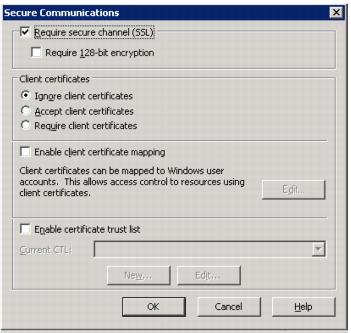
Once a certificate is purchased, installed and tested (the vendor and/or your IT staff is able to help with this), it’s a good idea to set the virtual directory created during install to only serve pages in secure mode by checking the Require secure channel (SSL) box on the Secure Communications dialog in the IIS Manager (Properties of the virtual directory > Directory Security tab > Edit button in the Secure Communications section):
Once that box is checked, the pages only load using the https:// protocol and fail if the http:// protocol is used. You then have to update any links to the pages to use https:// only.