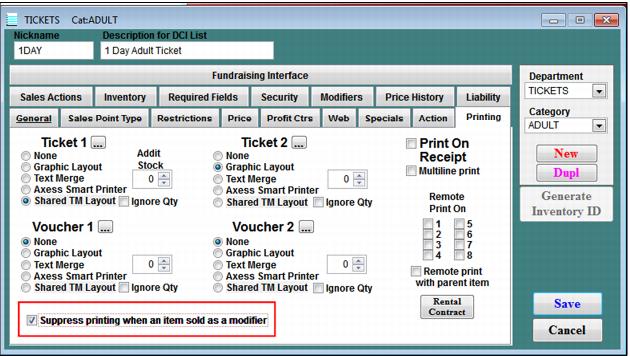
Ability to suppress printing
At times, it is necessary to configure items that can be sold independently or as part of a package. When the items are sold alone, the admission is counted and ticket is printed. However, when items are sold as modifiers in a package, ticket printing and admission counts are suppressed. In the past we configured out the ticket printing on Text Merge layout to suppress printing, but this did not work for Graphic layouts (Print At Home Tickets module specifically) and admissions could not be removed.
This enhancement allows for the following to be accomplished:
• Add the ability to suppress ticket printing when an item is sold as a modifier
• Add the ability to suppress counting admissions when an item is sold as a modifier
The E-Commerce pages and ww.dll respect the two check boxes on the Item Edit dialog that allow suppression of ticket printing and the option to not count admissions for the item when the item is sold as a modifier. These check boxes are as follows:
1. Item Edit > General tab > Remove Admissions when item is sold as a modifier - when this box is checked, the item is configured with an admission count when it is sold as a regular item, but not when it is sold as a modifier.
2. Item edit > Printing tab > Suppress printing when an item sold as a modifier - when this box is checked, a ticket prints upon finalization of the sale if the item is sold as a regular item, but not when it is sold as a modifier.