Installing FileSync
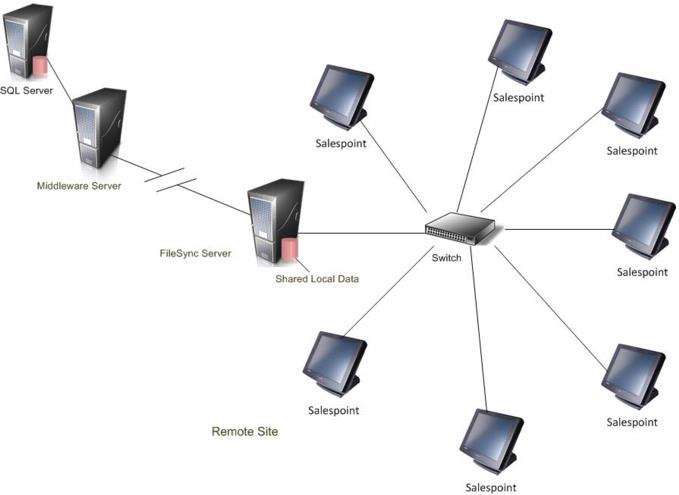
As shown in the following diagram, FileSync is installed on a separate server that is accessed by multiple salespoints at a single location. In Food Service, a salespoint can also be installed on the FileSync server if needed. With this architecture, FileSync acts as a cache between a Food Service installation and the SQL Server, speeding service to the restaurant/bar and insulating the location against the possible loss of connectivity to the SQL Server. The installer and updates files include FileSync Monitor, which is used to monitor FileSync operations.
Notes:
• Microsoft .NET Framework 4.0 must be installed prior to installing FileSync. If you try to run the FileSync installer and the .NET Framework 4.0 is not installed, you get an error message and cannot continue to install.
• A Classic salespoint can also be used as a FileSync server. However, licensing is still separate in SysManager. When set up, the Classic salespoint is established first, and then FileSync is installed on it as described here.
• Hardware and software specifications for the FileSync server are in the Salesware System Architecture and Specifications document.
• FileSync is a licensed component. See the Salesware Modules, Licensing and Maintenance document for information.
• Each FileSync computer requires a FileSync mode license.
• One FileSync mode license is issued with a Food Service license, but only by request.
• Most Food Service users do not need FileSync. Locations with poor network connectivity may choose to use FileSync to improve software functionality.
• Additional FileSync licenses are issued on a request basis.
• Salespoints need access to SalesEZ as well as the FileSync data store because some local data is refreshed using SalesEZ directly.