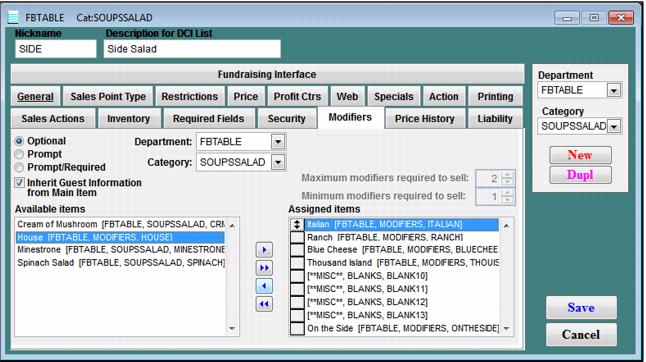
How to associate modifiers with items
1. In SysManager, within the DCI, configure an item.
2. On the Modifiers tab for the item, you can see a list of available items on the right and assigned items on the left.
3. Drag any items that you wish to use as modifiers from the available list to the assigned list by using the Arrow keys.
• > - pulls one item at a time from the left to the right (or vice versa via <)
• >> - pulls all items at one time from the left to the right (or vice versa via <<)
• Modifiers can be arranged in order in the assigned items list by using the up-down arrow at the left (drag and hold to move).
4. If you don’t see the modifiers you wish under the available modifiers list, you may need to toggle the department and category selections on the Modifiers tab to find the modifier item you are looking for.
Note: Because modifiers must be assigned to items on an item-by-item basis, it is extremely helpful to:
• Configure a fairly representative item, including modifiers for that item, and then
• Duplicate that item – including its associated modifiers – in order to avoid having to re-associate modifiers again and again each time a new item is created.
Exercise:
• Associate your three new Sauce modifiers to one of your items in the DCI.