How to enter custom text and prices for a modifier
Modifiers are highly customizable.
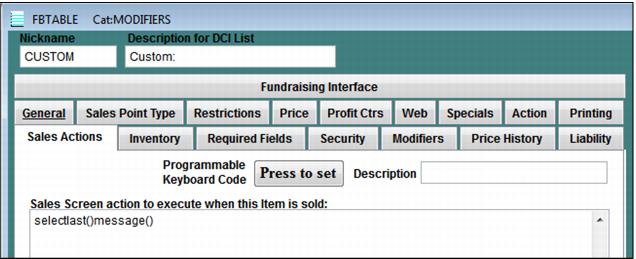
To enter custom text and prices for a modifier:
1. Create a modifier called CUSTOM: or whatever makes sense.
2. On the Sales Actions tab, enter the macro SELECTLAST()MESSAGE(). This macro prompts the operator to enter a message for that modifier. For more information about this macro, see Salesware User Guide for Advanced Users.
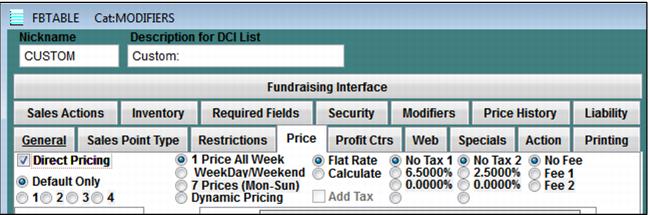
3. On the Price tab, enter 0.00 for the default price and check the direct pricing box. This prompts the operator to enter a price for the custom modifier. You only need this step if your custom modifiers might have an associated cost. Make sure to assign the appropriate profit center if your custom modifiers costs $$!
4. Select the appropriate remote printer for the custom modifier and attach the custom modifier to the appropriate items.
5. In the global .INI file for the Food and Beverage stations, add the tag <message> to the ItemDescFull line.
Example:
ItemDescMod=<items->descrip> <message>. This allows the operator to see what was typed next to each “custom” modifier.
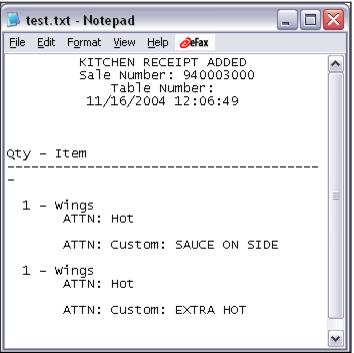
6. Use a remote layout that prints the message next to each modifier. This allows the custom text to be printed on the receipt for the kitchen.
7. When the operator selects the “custom” modifier for an item, she is prompted to enter a message when she closes out of the Modifier dialog. When she closes out of the message box the Direct Pricing dialog box prompts the operator for a price (if the custom modifier has been set up for direct pricing).
Remote ‘NEW ITEMS’ Layout Sample:
<|alltrim(printers->color_1)+CENTER('KITCHEN RECEIPT ADDED',40)|>
<|CENTER('Sale Number: '+ALLTRIM(STR(utility->sale_no,16,0)),40)|>
<|CENTER('Table Number: '+ALLTRIM(utility->first_name),40)|>
<|CENTER(iif(ALLTRIM(utility->first_name)="",'','Split Number: '+ALLTRIM(utility->first_name)),40)|>
<|CENTER(dtoc(date())+' '+time(),40)|>
<|NEWLINE()|>
<|'Qty - Item'|>
<|'----------------------------------------'|>
<|Details(IIF(MODIFIER(),alltrim(printers->color_2)+NEWLINE()+' ATTN: '+ALLTRIM(alltrans->descrip)+' '+ALLTRIM(alltrans->message),alltrim(printers->color_1)+NEWLINE()+STR(DeltaQty,3,0)+' - ' +ALLTRIM(alltrans->descrip)+ALLTRIM(alltrans->message))+NEWLINE(),TRUE)|>
Result: