Food Service : How to transfer a table to another server in Table Service Food and Beverage module How to transfer a table to another server in Table Service Food and Beverage module
You can transfer an existing table to another server.
To transfer an existing table to another server:
1. From the Select Table Number and Recall Table dialogs, recall a saved table.
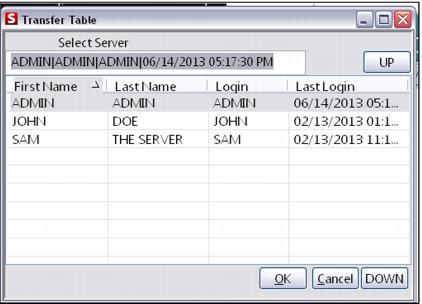
2. Click on the Table Transfer action button. You are presented with eligible servers. These servers are currently logged in and are part of your operator group or sub-group (as determined by the Group, SubGroup and EligibleServerByGroup .INI settings), as shown in the following screen capture:
Note: Operator groups are defined from SysManager > Activities > System Lists > Operator Groups.
3. Select the server to whom you wish to transfer the table. Click OK.
4. You are prompted to confirm the transfer. Click OK.