SysManager
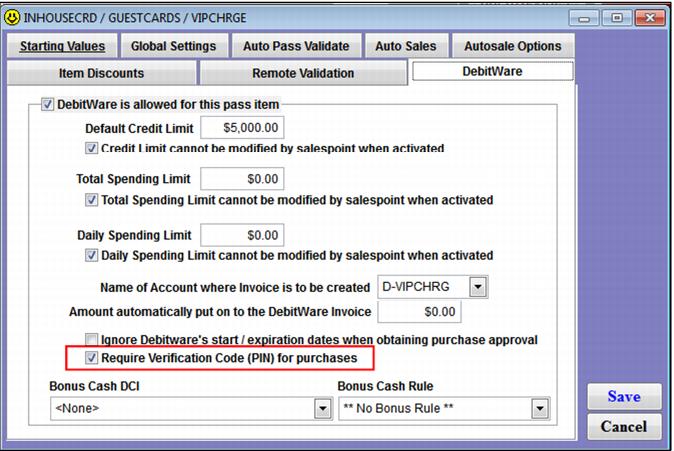
You must enable verification codes through SysManager > Item Edit > Action tab > Action Specifics button > DebitWare tab > Require Verification Code (PIN) for purchases check box.
When the Assign no from basket option is checked and the Require Verification Code (PIN) for purchases check box is also checked, the software assigns both the sixteen-digit card number and the corresponding four-digit verification code to the pass.
When the Assign no from basket option is checked and the Require Verification Code (PIN) for purchases check box is not checked, the software only assigns the sixteen-digit card number (no verification code is added to the gst_pass record).
If the user manually assigns a number from a pre-encoded stack (the Assign no from basket check box is not checked) and the Require Verification Code (PIN) for purchases is checked, the following options can occur:
1. The card magswipe can be pre-encoded with the card number and verification code and a swipe of the card populates both the swipe no and verification code fields.
2. Or, the operator can manually enter the card number and if the system is on-line it auto-populates the corresponding four-digit code from the server data (this is possible because all card numbers, even those that get exported, are stored in the data).
3. Or, the operator can manually enter the card number and the verification code if the system is off-line.
Essentially, the operator is not able to leave the Swipe tab without entering a verification code if the corresponding pass DCI requires it.
• If the user manually assigns a number from a pre-encoded stack (the Assign no from basket check box is not checked) and the Require Verification Code (PIN) for purchases is not checked, when the operator assigns the swipe_no from a pre-encoded stack of cards the verification code is not required.
Validation Number Information
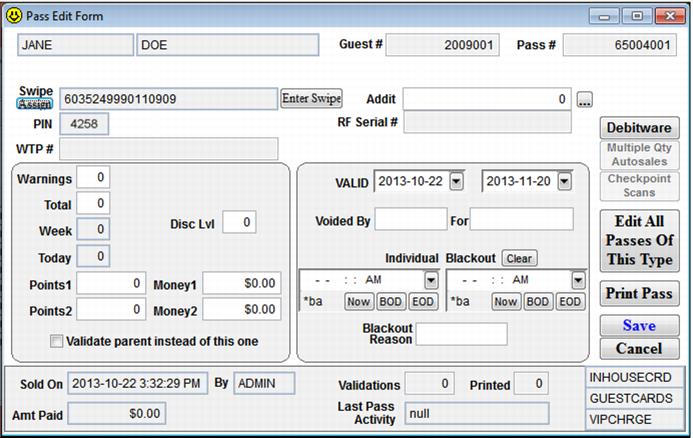
To view the validation number information within SysManager, go to Guests button > Guest Edit dialog > Pass# line item > Pass Edit form. This dialog now supports the new validation (PIN) number on DebitWare activated cards that are configured to require them on the Pass Template form. The Assign button populates the PIN field in addition to the Swipe number if the PIN is present in the Card Numbers assignment table. Editing and viewing (masked or unmasked) the PIN value follows the same rules and security as editing and viewing the swipe number.
Importing/ Exporting Card Numbers
• SysManager > Data Maintenance > Export Card Numbers: Exported file now contains a new column for PIN values, if present in the assignno table.
• SysManager > Data Maintenance > Import Card Numbers: Added support for import files that contain new PIN numbers on assignment numbers.