Configure your season pass/membership card item(s)
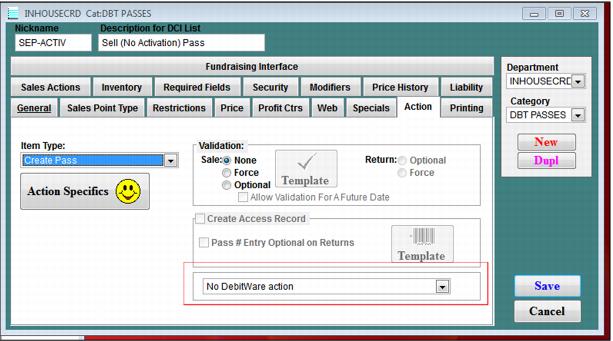
1. First, decide whether or not to activate the pass at the time of sale. If you need to activate the pass at the time of sale select DebitWare activation from the dropdown box on the Action tab. To activate the pass in a separate step, select No DebitWare Action.
Note: Siriusware Inc. recommends that you encode track 1 with the debit card number on all season passes (according to our specs). The product can be setup to be DebitWare Enabled which allows you to activate the card as a debit card, credit card or both (in-house credit) at your leisure.
• Siriusware Inc. recommends that you encode track 2 with the pass number. This allows you to accept the card at a point-of-sale as a discount card by hitting a programmable function key and swiping the card.
• It is recommended that you encode track 3 with the guest number which gives us the flexibility to access the guest number from the swipe if need be. If you need track 3 for hotel data or something else, leave it blank.
• The front of the card should have a barcode with the pass number in it formatted to our specifications and the pass number printed on the card. This allows the pass to be scanned for validation at the lift or at a point-of-sale.
• It is recommended setting up a test item, selling and printing the card to make sure everything encodes correctly.
2. If your passes expire one year past purchase, configure a time span of 365 on the General tab and do not enter pass valid dates on the Starting Values tab within the Action Specifics button located on the Action tab for the pass.
3. If your passes purchased anytime during the season expire on a specific date, enter 0 for a time span and enter pass valid dates on the Starting Values tab within the Action Specifics button located on the Action tab for the pass.
4. Make sure to check the Assign number from basket check box and enter the correct num_source from your AssignNo table (Starting Values tab), assuming that the card numbers for the season passes/membership cards are assigned from the server.
5. After all other configuration is complete for the season Pass/Membership card (such as valid dates or layout) click the DebitWare tab and check the DebitWare is allowed for this pass check box.
6. Usually season pass/membership cards are not extended credit, so ensure that the credit limit is $0 and do not allow the operator to edit this limit. Total spending and daily spending limits really depend on the program, but tend to be set per guest, not per DCI, so keep these limits at $0 but allow operators to edit these limits at the POS.
7. Select the account configured to track season Pass/Membership card invoices.
8. Do not enter an amount in the Pre-load field unless your particular program includes this feature. (For instance, the total pass price is $575 dollars; the pass costs $500 and $75 is automatically loaded on to the card.)