Selling charge cards
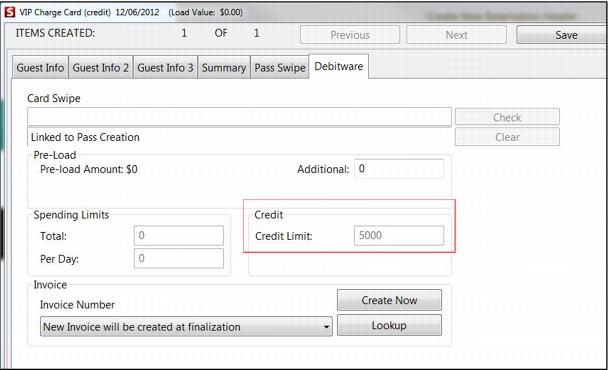
1. To sell the charge card, select the charge card item in the menu and click on the Set Guest button. Enter guest information and either save (if no activation takes place at the time of sale) or click on the DebitWare tab (if activation takes place at the time of sale).
2. If activating at the time of sale, the operator may or may not need to click on the DebitWare tab and edit the credit, total spending and daily spending limits based on the charge card program rules. For instance, an inter-department charge card DCI may always have a set non-editable credit limit amount of $5000; but a VIP group member may need to have his credit limit determined at the time of card activation based on the incentives offered to the VIP group.
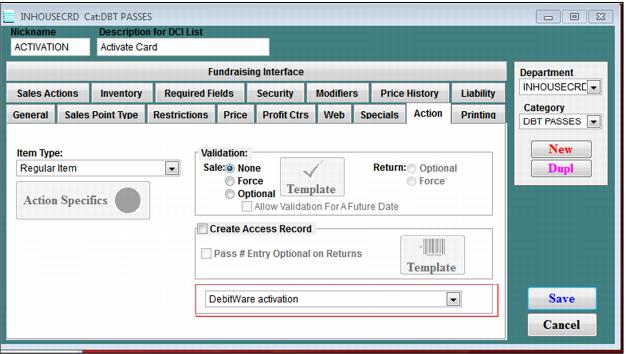
3. If the charge card is not configured to be activated at the time of the sale, it can be activated later by selling an activation item. This item is configured in SysManager as a Regular Item on the Action tab with DebitWare activation selected from the dropdown box.
4. At the salespoint, sell the activation item, click the DebitWare line item button, swipe the card into the Card Swipe field and click Check. Edit the credit, total spending and daily spending amounts as applicable and click Save. Remember that cards activated on the same line item are linked together on the same invoice (without the setting DWLineItemLink=FALSE) and that cards may be linked to existing invoices by using the Lookup button.
5. Typically, a re-load item is sold to “pay off” charge cards. To pay off a charge card, sell the re-load item, enter the card number in the Card Swipe field and click Check. Enter the amount to be paid-off if the Re-load Amount field and click Save. At finalize you are forced to collect payment for the amount entered in the Re-load field.