In SysManager
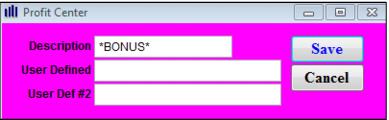
1. Create a Profit Center (or more than one, depending on reporting needs) that accounts for the bonus load amounts.
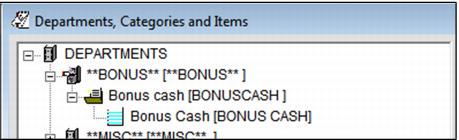
2. Create Categories/Items under the **BONUS** department and select the appropriate profit center. It is not necessary to have a **BONUS** DCI per type of program, but at least one **BONUS** item needs to be configured to track the offsetting records for accounting purposes.
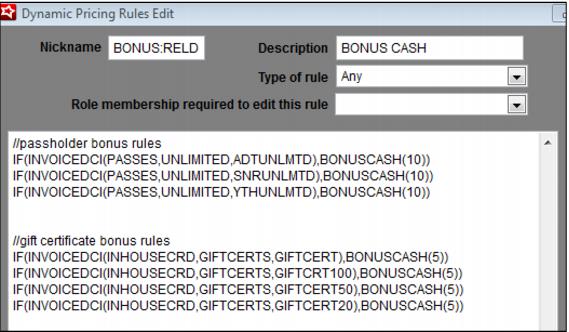
3. Create a Dynamic Pricing Rule (or multiple rules) for calculating the Bonus Cash amounts. The INVOICEDCI can be specified so that a single reload item can be used to add varying bonus amounts based on the original DCI of the card/pass being loaded.
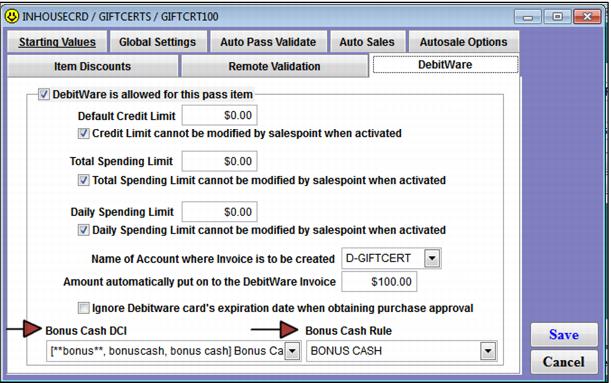
4. The Dynamic Pricing Rule is attached on the DebitWare tab on the Action Specifics dialog. Reload and Activate items looks up the Dynamic Pricing Rule associated with the original Pass/DebitWare DCI.
Note: Dynamic Pricing Rules can allow a flat dollar amount load of Bonus Cash even when the load amount for the card is zero.
Example:
Using a Dynamic Pricing Rule with a % amount for Bonus Cash (BONUSCASH(10)) and with the load amount on the DebitWare tab for the item as zero, results in the following:
1. Place following line in the DebitWare item:
BONUSLOAD(,10,TRUE)
In Sales, the Bonus Cash amount was $10 and the load amount was zero (the $10 came from the Bonusload Sales screen action macro)
2. Then, take the BONUSLOAD(,10,TRUE) line out of the Sales Action tab.
In Sales, the Bonus Cash amount was zero, and the load amount was zero.
3. Change the Dynamic Pricing Rule to be BONUSCASH(,10).
In Sales, the load amount was zero and the Bonus Cash amount was $10.
Template Edit form
Changes to allow Bonus Cash, have been made to the Template Edit form (Action Specifics button > Action tab > Item Edit form > Create Pass Item type) on the DebitWare tab:
1. A dropdown control is called Bonus Cash DCI. This dropdown displays a list of all non-hidden DCIs in the **BONUS** department and their descriptions (items created in the **BONUS** department are used to track the offsetting records for Bonus Cash for accounting purposes). The dropdown list also includes a <None> value at the top.
2. A second dropdown control is called Bonus Cash Rule. This dropdown displays all Dynamic Pricing Rules that are configured as rule type Any or Dynamic Pricing Rule. This is used to select the Dynamic Pricing Rule to use for calculating Bonus Cash amounts.
3. DebitWare pass items also need to have the BONUS DCI set in the template that is used to create offsetting transactions for the Bonus amounts. Reload and Activate items look up the **BONUS** DCI associated with the original Pass/DebitWare DCI.
4. A new field called Additional Bonus is present on the DebitWare tab that allows manual entry of a Bonus Cash amount, as long as the user has security (X_SETBONUS) and the DebitWare item has Bonus Cash defined.
Sales screen action macros
Two Sales screen action macros are available to enhance Bonus Cash functionality. These are able to be entered in the Sales screen action macro field for the item and are as follows:
• LOAD - is used to load funds to a card. It has the option to add to or replace the load value that is preset on the DebitWare tab for the item and can be a flat amount or percent. It has the following format: LOAD(CASH,[TRUE/FALSE]). By default, the LOAD value takes precedence over the default preload value.
Example:
A card with a default preload value of $10 and the Sales screen action macro LOAD(50) as defined in Sales Actions is loaded with $50. If the Sales screen action macro LOAD(50,TRUE) is defined in Sales Action, the card is loaded with $60 (the $10 preload + the $50 reload). The operator may override the load amount on the DebitWare tab.
• BONUSLOAD is used to add Bonus Cash. It also has the option to add to or replace any previously calculated Bonus Cash and can be a flat amount or a percent. There must be a Bonus Cash DCI defined in order for this option to function. BONUSLOAD has the following format:
BONUSLOAD(PERCENT,[CASH],[TRUE/FALSE])
The first field adds a percent of the Preload/Reload amount as Bonus Cash. The second field adds a flat value of Bonus Cash to the card (if the first field is 0 or empty). By default, the amount defined by BONUSLOAD takes precedence over Bonus Cash calculated by the Dynamic Pricing Rule unless the third field is present and set to TRUE.
Example:
A card has a default preload value of $50 and a Dynamic Pricing Rule to add 20% of the loaded amount as Bonus Cash. The Sales screen action macro BONUSLOAD(10) adds $5.00 bonus cash to the card (the Bonus Cash from the Dynamic Pricing Rule is ignored). The Sales screen action macro BONUSLOAD(,10) adds $10 bonus cash to the card. BONUSCASH(,10,TRUE) adds $20 bonus cash to the card ($10 from the Sales screen action macro +$10 from the Dynamic Pricing Rule) If the operator has correct security (X_SETBONUS) it is possible to override the Bonus Cash added by this Sales screen action macro on the DebitWare tab.