SysManager
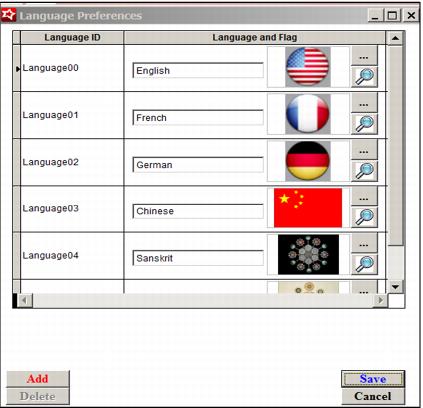
There are two new dialogs that are used for configuring the language functions.
1. Preferences > Languages
• On this dialog languages to be used are specified and a flag in .bmp format can be assigned for display in Kiosk mode
2. Activities > System Lists > Translations
• On this dialog common Sales labels as well as item descriptions can be translated and displayed at the kiosk. A list of the common Sales labels follows:
• Call for Help
• Cashless Kiosk
• Classic Kiosk
• English
• French
• Manually Enter Number
• Please Select Kiosk Mode
• Scan Card or Touch Screen to Begin
• Will Call Kiosk
• Calling for help...A staff member is being informed of your request
• Cancel Call For Help
• Enter your card number
• Enter Reservation Number
• Select More Products or Press Proceed to Checkout
• Qty
• Item
• Disc.
• Price
• Self Sales
• Unreadable Card
• Welcome - Card Read
• Please Swipe a Credit Card
• You have selected:
• Press 'Finalize' to finish or Return to Previous Screen.
• Please Insert or Swipe Card on pinpad to pay.
• Your %s card will be charged %.2f for this transaction.
• Your %s card is being charged %.2f for this transaction.
• Card Swipe is Bad. Please Select Credit Or Debit Card.
• Card Swipe is Bad. Please Swipe Another Card.
• Please Select Credit Or Debit Card
• Please use pinpad to complete payment.
• Transaction Complete
• Thank you!
• Unable to Complete Transaction
• Approved
• Approving
• Approving Payment
• Printing
• Welcome
• Credit Card Only
• Error
• The scanned card is not active
• Scanning Card
• No Match Found
• - Cancel -
• - Cash Out -
• - Exchange -
• - Load -
• Cashless Kiosk Header Msg
• Load
• Exchange
• Cash Out
• Cancel
• Not available at this kiosk
• Scan a different card
• Drain the available funds in exchange for cash
• Debitware Card Payment
• Use a card to load money onto the card
• Transfer money from a wristband to a card to take home
• Amount:
• Your Session is About to Timeout. Press 'OK' to Continue
• %.2f will be loaded onto your account.
• Continue
• Press '%s' to proceed or '%s' to Quit
• Press '%s' to proceed
• Successfully loaded
• on card
• Load Failed
• Please swipe card
• Processing Card
• Card Swipe Failed. Press 'OK' to Continue
• Your wristband is no longer valid, please take your card from below
• Click to Cancel
• Please Insert Money
• Money is being inserted
• Money is being stored
• Money is being returned
• Money Received
• Return $%.0f bill
• Please Scan Wristband
• Owed
• Card Number
• Available Balance
• Debitware Status
• Invoice Number
• Pass Number
• Pass DCI
• Pass Valid Dates
• to
• Voided
• Pass Voided: By
• For
• Expired
• Pass Status
• Card Status
• Unable to retrieve Pass Information
• Guest Number
• Guest Name
• Credit Limit
• Spending Limit
• Spending Limit Remaining
• Daily Spending Limit
• Daily Spending Limit Remaining
• Purchase History
• Purchase New Card