Equipment Levels
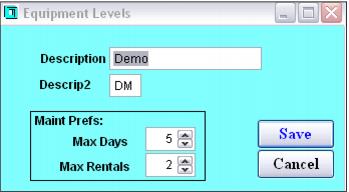
Rental equipment levels can be used to define the technical ability of the rental equipment. Levels are also often associated with price differences within the same type of equipment. Examples include basic, sport, performance or demo. Each level may be configured with a Description and a Descrip2 (short description). Optionally, maintenance preferences may also be defined.
• Description – Appears in the TechStationPC application, in SysManager > Activities > Rental Activities > Rental Inventory, used when configuring rental items and used in various rental reports.
• Descrip2 – Short name that appears on the hand-held Worth Data Units.
• Maintenance Prefs: Max Days – Number of days that can pass before equipment of this level is due for maintenance.
• Maintenance Prefs: Max Rentals – Number of times that equipment of this level can be rented before maintenance is due.
Both pay-up-front and pay-upon-return rental processes need to have equipment levels configured that match the rental inventory. Pay-upon-return rental shops need to configure an additional level called
*UNLIMITED*. This level is associated with rental contracts used by guests in a pay-upon-return rental flow in order to allow guests to checkout any level of equipment during their rental period. Pay-up-front rental shops may also want to configure an
*UNLIMITED* level, because this level is used to rent out items such as ski poles that may be rented by guests but are not closely tracked in inventory. The equipment level
*CUSTOMER* can also be configured for use with guest owned equipment in both types of rental shops. See
Special rental inventory items for details.