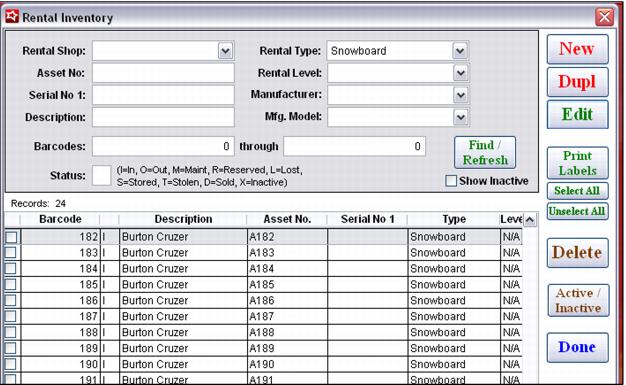
Viewing rental inventory
Rental inventory is entered into the Salesware system within SysManager > Activities > Rental Activities > Rental Inventory.
The filters available for viewing rental inventory within this list are:
• Rental Shop: (home shop)
• Asset No:
• Serial No 1:
• Description:
• Barcodes: range
• Status: (In, Out, Maint, Reserved, Lost, Stored, Stolen, Sold, Inactive)
• Rental Type: (from the equipment types list)
• Rental Level: (from the equipment levels list)
• Manufacturer: (from the rental equipment manufacturers list)
• Mfg. Model: – Model within the Manufacturer selected (from the rental equipment manufacturers list)
The information displayed on the main grid includes:
• Barcode
• Status
• Description
• Asset No.
• Serial No 1
• Equipment Type
• Equipment Level
• Manufacturer
• Mfg. Model
• Size
• Date/Time of original entry
The columns listed on the main rental inventory grid may be double-clicked in order to sort the results within the selected column. Typing then takes you to the first record within the sorted list based on the closest match.
Example:
The results displayed the status column may be double-clicked to sort the results alphabetically based on Status. Then, typing an O takes you to the first record within the sorted results that has a Status of O.