Pay-up-front: Rental cards
Rental cards are essentially revolving Rental forms. They are very useful for groups that rent equipment one day a week over the span of several weeks. Rental cards are simply rental package items that are sold to guests – the difference is the formatting of the barcode. A Rental form barcode uses the prefix RF followed by the Rental form number; a rental card barcode uses the prefix RC followed by the guest number. Rental cards are typically used in the following manner:
1. A rental package item is configured with the appropriate rental components, price, profit center, layout, etc.
Example:
A six Week Kids Ski Program item is configured that costs $60 and allows a basic ski, basic boot and helmet to be rented. A layout is configured for Ticket 1, Ticket 2, Voucher 1 or Voucher 2 that includes the guest name and other relevant information along with a barcode encoded with the prefix RC followed by the guest number. (This assumes that % has been programmed into the scanner.) The stock for the Rental Card Item layout as well as the information printed on the stock can vary depending on program requirements. For example it can be a small label that can be adhered to a pre-printed card or a full 8½ x 11 piece of paper, or a small card that can be easily put in a pocket or a piece of ticket stock that can actually be attached to a piece of clothing, etc.
2. The six Weeks Kids Ski Program is sold to Joey Smith. Upon finalization of the rental card sale, a ticket is printed with Joey’s information including the rental card barcode.
3. Joey’s rental card (the ticket that printed at the time of sale) is put into the group folder for later use.
4. When Joey’s group arrives, the rental card ticket/forms are distributed to the group members. Each group member takes his/her rental card ticket/form to the TechStations in order to get equipment.
5. At the TechStation, Joey’s rental card barcode is scanned, which retrieves an electronic Rental form for Joey. Equipment is attached to Joey’s electronic Rental form.
6. The rental tech keeps Joey’s rental card and later files it back in the group folder for use the next week.
7. At the end of the day, Joey returns his equipment and the electronic Rental form that was generated by the scan of the rental card barcode is closed.
8. Next week, the same process occurs: Rental cards are distributed to guests; guests proceed to the tech stations; electronic Rental forms are generated when the rental card is scanned; rental equipment is checked-out; rental equipment is returned; electronic Rental form is closed.
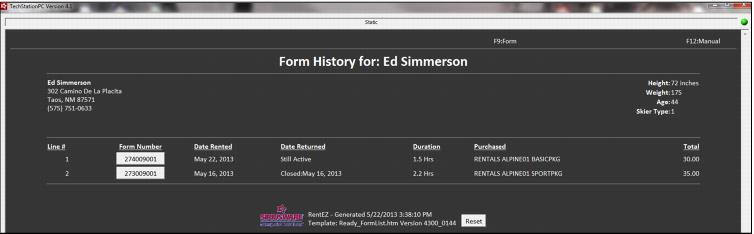
The Rental forms generated by the scanning of a rental card start with a - except for the very first Rental form, because it is created at the time of the rental card sale. So, for example, the form history for a guest who has used a rental card two times might look like this:
Note: Rental cards can only be used once per day to generate a new electronic Rental form for the guest. Once a Rental form is generated from the scan of a Rental card, another Rental form cannot be generated for the scan of that same rental card until the next day – and that only occurs if the current Rental form linked to the guest’s rental card is closed.