Rental Contract layout
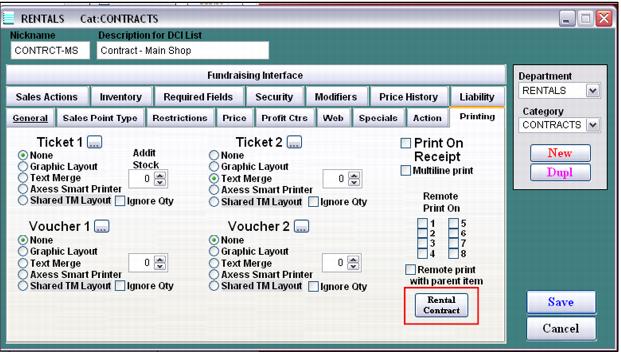
In order to print a ticket or label with relevant information such as guest name, height, weight, shoe size, skier type, Rental form number and Rental form barcode, a Text Merge layout must be configured for the rental contract item. This Text Merge layout is inserted within rental contract item’s configuration on the Printing tab by clicking on the Rental Contract button.
Remember, when configuring the Rental form barcode, it must contain %RF followed by the Rental form number (which is the same as the transaction number when the system is configured to auto-generate Rental form numbers). Alternatively, the % may be programmed into the TechStation scanners and RF can be configured at each tech station as the “assumed” prefix if no prefix is included in the barcode. Although these alternative options are available, it can impact the flexibility of using the scanners for other purposes and it prevents the ability to configure the “assumed” prefix at the tech stations for rental inventory equipment scans (RI prefix).
The salespoints that print rental contracts need to have the printer specified within Tools > Sales Pt Setup > Printing > Page 1 > Rentals.
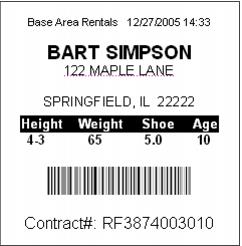
The sample layout below includes many of the common fields that are used in these types of Contract layouts:
JUSTIFY CENTER
U B20 (2,0,90) 770 450 <|'Base Area Rentals '+tmp_date+' '+tmp_time)|>
U C40X20 (6,5,90) 730 450 <|ALLTRIM(guests->first_name)+' '+ALLTRIM(guests->last_name)|>
U B20 (3,0,90) 715 450 <|ALLTRIM(alladres->ml_address)|>
U B20 (3,0,90) 710 450 <|ALLTRIM(alladres->ml_addres2)|>
U B20 (3,0,90) 690 450 <|ALLTRIM(alladres->ml_city)+', '+ALLTRIM(alladres->ml_state)+' '+ALLTRIM(alladres->ml_zip)|>
U B20 (3,0,90) 660 450 <|'Height Weight Shoe Age'|>
U B20 (3,0,90) 630 450 <|' '+STR((guests->height-5.9)/12,1,0)+'-'+ALLTRIM(STR((guests->height/12 - VAL(STR((guests->height-5.9)/12,1,0)))*12,2,0))+' '+STR(guests->weight,3,0)+' '+STR(gst_rent->shoesize,4,1)+' '+age(guests->birth_date)|>
BR code128(2:4) 550 350 70 <|'%RF'+alltrim(str(tmp_tranno,12,0))|>
U B30 (2,0,90) 500 450 <|'Contract#: RF'+alltrim(str(tmp_tranno,12,0))|>
F 660 220 25 483
END
Sample output:
Another printing option available for any item that collects guest information is a barcode encoded with %LKUP(guest_no). A barcode encoded in this manner can be used for three different functions:
1. It can be scanned in Sales to look up the guest. When this is done, the Summary tab for the guest is displayed.
2. It can be scanned after clicking on the Other button on a line item in a sale in order to attach the guest to that item.
3. It can be scanned at the TechStation to lookup the form history for the guest.
A sample barcode Blaster Text Merge layout that includes a properly encoded barcode for this purpose is below. If salespoint or TechStation scanners are encoded with characters, the barcode expression needs to be modified based on the scanner configurations. To maximize flexibility in using barcode scanners at the point-of-sale or at TechStations, prefixes can be included in barcodes as opposed to configuring prefixes in the actual scanners.
! 0 100 750 1
JUSTIFY CENTER
U B20 (2,0,0) 500 90 <|'Guest Card’|>
U C50X30 (6,5,0) 500 130 <|ALLTRIM(guests->first_name)+' '+ALLTRIM(guests->last_name)|>
B code128(2:4) 400 400 70 <|'%LKUP('+alltrim(str(guests->guest_no,12,0))+')'|>
U B30 (2,0,0) 500 420 <|'Guest #: '+alltrim(str(guests->guest_no,12,0))|>
END