Pay-after-checkout: Sales
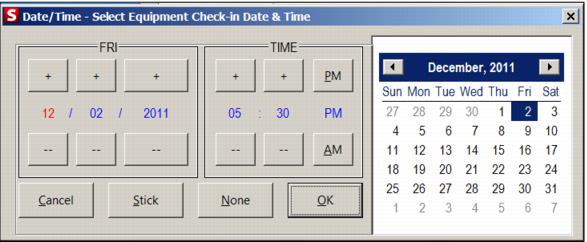
Support was added for pay-after-checkout rental process in Sales. Rental Contracts which are configured with 'calculate specific end time dynamically' and have a Rental Auto-Sale Rule which contains the macro 'PREPROCESS(PAYATCHECK())' may be processed/finalized before equipment has been checked in. When the sale is recalled (%RFXXXXXX), the following dialog appears to set the return time. The return date of any equipment checked out to the contract is set to the end date of the contract. Equipment check-in time may be changed from the default by select of the Date / Time button on the line item and the price of the rental is calculated based on the entry made.
If the rental rule is configured with an amount of time allowed for the return or deletion, rental inventory is no longer analyzed by the rental rule by:
Example:
CONVERTDAY(0-749,>=0,>=30,FULL DAY)
Where ">=30 allows for thirty minutes for returns or deletions.