Pay-upon-return: Self Entry process
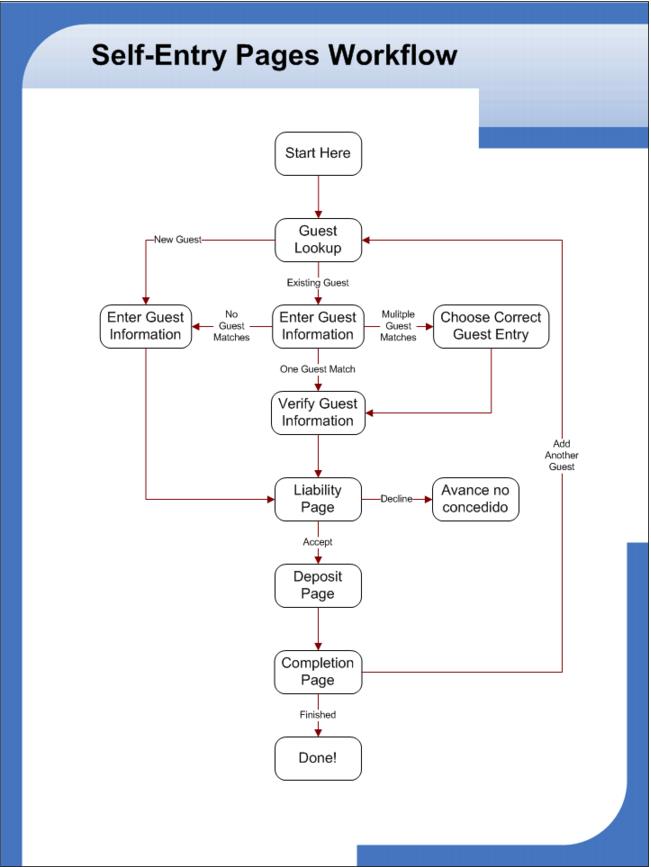
The Self Entry process for guests is simple.
1. A guest steps up to a Self Entry station.
2. The guest types in her first and last name – or a partial first and last name.
3. The guest can look up an existing record or create a new record.
• When looking up an existing guest record, if a single exact match is found the guest is taken to a verification step where she must enter her birth date before the details of the guest record are displayed.
• When looking up an existing guest record and multiple matches are found, the guest can select her record from a list of matches. A piece of additional information, such as the last two digits of a phone number, can be displayed next to each possible match to help the guest select the correct record. Once a match is selected, the guest is taken to a verification step where she must enter her birth date before the details of the guest record are displayed.
• If the guest is creating a new record, she is asked to confirm the first and last name (as a double-check for spelling issues) before continuing the Self Entry process.
4. After the birth date verification step or the selection to create a new guest, the guest is taken to the details of her information where she can add information to or edit any available field.
5. The guest may or may not be prompted to accept a liability statement (based on the web.config file configuration).
6. The guest may or may not be required to enter deposit information (based on the web.config file configuration). If the guest enters a credit card for deposit, that credit card number is written into her guest record along with the expiration date and billing zip code.
7. The guest can either enter more family members or finish.
8. Every completed Self Entry transaction creates a file in the directory specified within the web.config file for the Self Entry pages in the format of yyyyMMdd_hhmmss_LastName_FirstName.se.
Once the Self Entry process is complete, the guest proceeds to a salespoint (contract station) where an operator starts the rental contract for the guest.
A sample Self Entry flow is shown in the following: