Pages.xml options
The pages.xml file is typically used to determine what text and fields are displayed as well as what fields are required within the Self Entry process. To edit the text that displays, find the section in question and modify it.
Example:
To edit the start page to say Nordic Center, modify this section:
<StaticControls_SP>
<Name>lblTop1</Name>
<Text>Siriusware Rentals</Text>
<cssClass>lblHeader</cssClass>
</StaticControls_SP>
To look like this:
<StaticControls_SP>
<Name>lblTop1</Name>
<Text>Nordic Center</Text>
<cssClass>lblHeader</cssClass>
</StaticControls_SP>
In order to modify various fields that the guest must complete, edit the Dynamic Controls section relevant to the information to be collected.
• To edit the label next to the field, enter the text between the <LabelText> </LabelText> tags.
• To make the field optional, enter FALSE between the <Required> </Required> tags.
• To remove the field altogether, comment the section out by adding <! -- to the beginning of the section and --> to the end of the section.
Example:
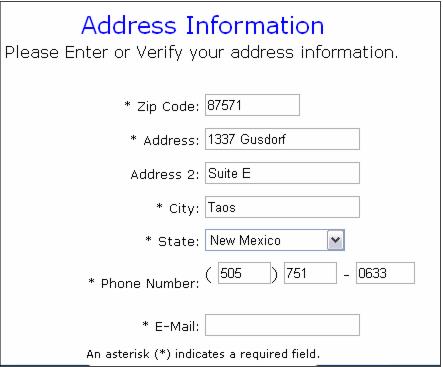
This section controls the Email Address field. With the following settings in place, the field displays and the guest is required to enter information into this field.
<DynamicControls_GA>
<Name>g_Email</Name>
<WebControl>SingleText.ascx</WebControl>
<DBField>g.e_mail</DBField>
<MaxChars>100</MaxChars>
<Columns>20</Columns>
<LabelText>E-Mail:</LabelText>
<LabelCSS>lblText</LabelCSS>
<Required>TRUE</Required>
<RequiredText></RequiredText>
<RequiredCSS></RequiredCSS>
</DynamicControls_GA>
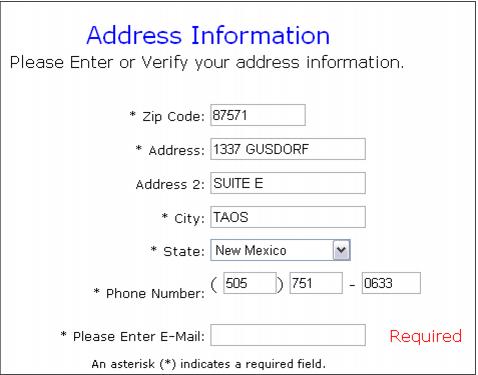
To label the field something other than E-Mail, enter the desired text between the <LabelText> </LabelText> tags such as this:
<DynamicControls_GA>
<Name>g_Email</Name>
<WebControl>SingleText.ascx</WebControl>
<DBField>g.e_mail</DBField>
<MaxChars>100</MaxChars>
<Columns>20</Columns>
<LabelText>Please Enter E-Mail:</LabelText>
<LabelCSS>lblText</LabelCSS>
<Required>TRUE</Required>
<RequiredText></RequiredText>
<RequiredCSS></RequiredCSS>
</DynamicControls_GA>
To make the field optional, enter FALSE between the <Required> </Required> tags:
<DynamicControls_GA>
<Name>g_Email</Name>
<WebControl>SingleText.ascx</WebControl>
<DBField>g.e_mail</DBField>
<MaxChars>100</MaxChars>
<Columns>20</Columns>
<LabelText>Please Enter E-Mail:</LabelText>
<LabelCSS>lblText</LabelCSS>
<Required>FALSE</Required>
<RequiredText></RequiredText>
<RequiredCSS></RequiredCSS>
</DynamicControls_GA>
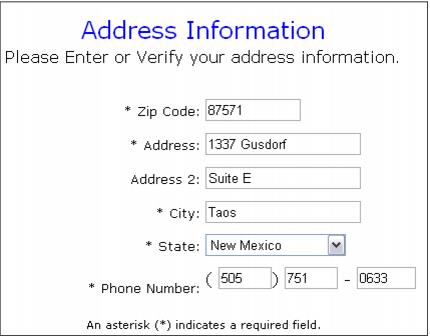
To remove the field altogether, add <!-- to the beginning of the section and --> to the end:
<!--<DynamicControls_GA>
<Name>g_Email</Name>
<WebControl>SingleText.ascx</WebControl>
<DBField>g.e_mail</DBField>
<MaxChars>100</MaxChars>
<Columns>20</Columns>
<LabelText>Please Enter E-Mail:</LabelText>
<LabelCSS>lblText</LabelCSS>
<Required>FALSE</Required>
<RequiredText></RequiredText>
<RequiredCSS></RequiredCSS>
</DynamicControls_GA>-->
Warning: Use caution when editing the pages.xml file! Always make a backup of the original pages.xml file before editing it so that a working copy is always accessible if any changes made to the pages.xml file cause problems.