In SysManager
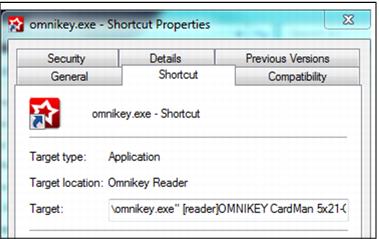
To use the Omnikey reader in SysManager (for rental inventory entry), browse to Program Files > Siriusware > SysManager and look for a file named omnikey.exe. This file can be run directly by double-clicking on the .exe and selecting the name of the reader when prompted. Alternatively, a shortcut can be created by right-clicking on the omnikey.exe and selecting Send to Desktop (Create Shortcut). If a desktop shortcut is used the following steps must be completed:
1. Right click on the shortcut and go to Properties
2. Add the following to the end of the existing line within the Target box, modifying the reader name as appropriate:
[reader]OMNIKEY CardMan 5x21-CL 0[/reader]
Example:
A complete target line would look similar to this:
"C:\Program Files (x86)\Siriusware\SysManager\omnikey.exe" [reader]OMNIKEY CardMan 5x21-CL 0[/reader]
To enter RFID numbers into the rental inventory in SysManager, make sure that the omnikey.exe is running first (it can be placed in the startup menu so that it always starts with the PC). Next, put the cursor into the field where the RF number is entered and wave/tap the RF media on the reader.
Note: The omnikey.exe only needs to be installed on computers where SysManager is used to enter rental inventory numbers. It is not installed on rental salespoints.