Saving and recalling reservations
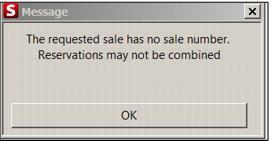
New reservations must first be saved before printing confirmations or finalizing. Reservations can only be saved with products attached. If an attempt is made to combine two reservations together, an error message is displayed, “The requested sale has no sale number. Reservations may not be combined.”
To recall a reservation:
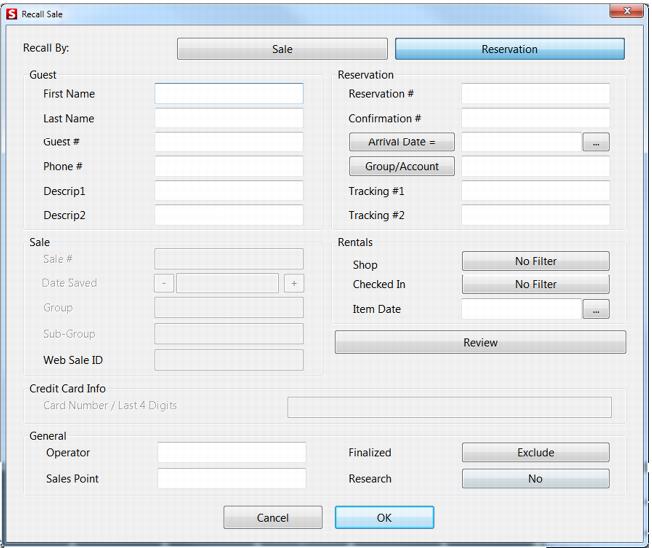
• Click the Recall button which is only available in an empty Sales interface (see following screen capture).
• Reservation salespoint defaults to recall by reservation.
• Non-reservation salespoints can default to recall either by Sale or by Reservation. The default is to recall by Sale. The default is controlled by the .INI setting: RecallByReservation=TRUE.
• The Review Reservations button provides the ability to review/finalize/no show multiple reservations. The matching reservations list returns after a sale is processed via the Cancel, Finalize or No Show buttons.
Information for guests added to items in a sale is no longer automatically recalled from the local data when the sale has an associated Reservation Header. When a Reservation Header is initially created, the information from the guest attached to the Reservation Header comes from the server and writes the record to the local data. If an item is immediately added to a sale that requires a guest and the Quick Select button is used to add the Reservation Header guest or the Reservation Header guest is manually entered on the Guest tab, the guest information comes from the local data. Other guests added to items in the sale has their information come from the server. If the reservation is recalled and the Quick Select button is used to add a guest to an item or guest information is manually entered on the Guest tab, the guest record always comes from the server.