Productions
To create a Production:
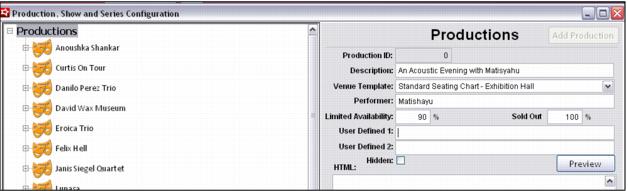
1. Start by navigating to SysManager > Activities > Reserved Seating > Production & Show Configuration. On the Production dialog, events such as an artist's engagement or the staging of a piece of theatre and all the shows comprising the Production/Event are configured. A Series of Shows from different Productions can also be configured on this dialog in the Series section.
2. A production is created by selecting Productions at the top of the left navigation box of the dialog or an existing Production, and then hitting the Add Production button from the upper right corner of the dialog.
3. Provide a Description, select the Venue Template and enter the Performer.
4. Limited Availability and Sold Out levels are defaulted to 90% and 100%, but can be adjusted as necessary per Production.
5. New Productions are added to the bottom of the Productions list, but are re-sorted alphabetically once the Productions & Shows Configuration activity is closed and re-opened.
Note: When a new production is added it is automatically assigned a Production ID number.
Note: Currently the User Defined and HTML fields are not in use. They have been added as placeholders for future development, but are not operational at this time.